Introduction
Character.AI offers a paid plan called c.ai+. If you no longer want to pay for it, the cancellation steps depend on how you subscribed: on the Character.AI website, or through the Apple App Store or Google Play.
If you subscribed on the website, you manage the plan through a customer portal that you open from a link sent to your email. This guide explains each method step by step, and what to do if something goes wrong.
Quick Answer: How Do You Cancel c.ai+?
- Find out how you subscribed: the Character.AI website, the App Store, or Google Play.
- Website subscribers: open the Character.AI payment portal, enter your email, open the link you receive, and click Cancel Plan.
- iPhone or Android subscribers: cancel in your Apple ID or Google Play subscription settings.
- Save the confirmation until your next billing date has passed.
How to Cancel Character.AI Subscription on the Website
Use this method if you paid for c.ai+ directly on the Character.AI website with a card. These steps follow the official Character.AI Help Center:
- Open the Payment Portal link on Character.AI’s help page for managing or cancelling c.ai+.
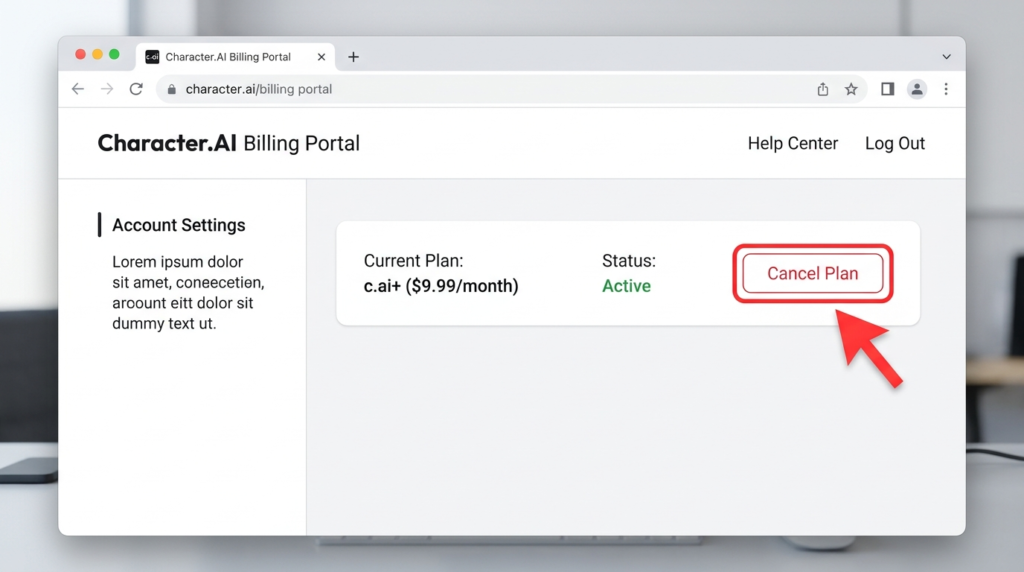
- Under Website Subscription Management, enter your email address. Character.AI sends a link to your customer portal.
- Check your inbox for that email. If you do not see it, choose Use a different email and enter the email linked to your Character.AI account.
- Click the Log in button in the email.
- In the portal, click Cancel Plan.
In the same portal you can also change your payment method (pencil icon or + payment method) and update your billing address (Update Information).
After you cancel, check your email for a confirmation and keep it until your next billing date has passed.
Quick Summary: Where to Cancel c.ai+
| Where You Subscribed | Where to Cancel | Who Handles Refunds |
|---|---|---|
| Character.AI Website | Character.AI Customer Portal (via email link) | Character.AI Support |
| iPhone / iPad (iOS) | Apple ID Settings > Subscriptions | Apple (:reportaproblem.apple.com) |
| Android Device | Google Play Store > Payments & subscriptions | Google Play Support |
How to Cancel c.ai+ on iPhone or Android
If you subscribed inside the Character.AI mobile app, the App Store or Google Play handles your billing. Cancel there.
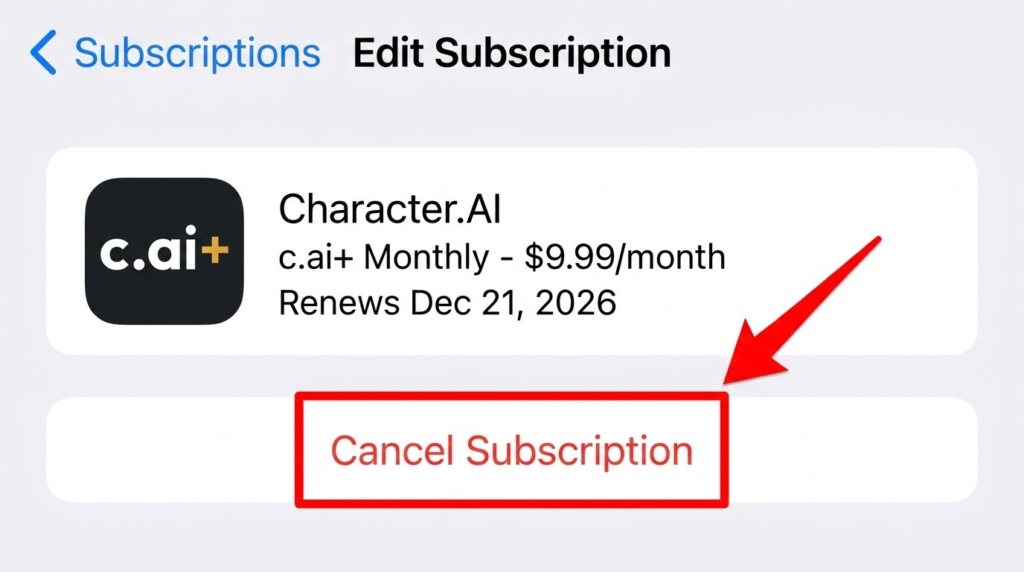
iPhone or iPad (Apple ID):
- Open the Settings app.
- Tap your name at the top.
- Tap Subscriptions.
- Select Character.AI and tap Cancel Subscription.
Android (Google Play):
- Open the Google Play Store app.
- Tap your profile icon in the top right corner.
- Tap Payments & subscriptions, then Subscriptions.
- Select Character.AI and tap Cancel subscription.
Menu names can change slightly between versions. Character.AI’s own help page also points mobile subscribers to the iOS and Android instructions.
Warning: Does Deleting Your Character.AI Account Cancel Your Subscription?
No. Uninstalling the Character.AI app or permanently deleting your Character.AI account does not automatically cancel an active c.ai+ subscription.
If you delete your account first, you may lose access to the settings needed to manage your plan while your card continues to be billed every month. Always cancel your subscription first, wait for the confirmation email, and then delete your account if you wish to leave the platform completely.
What Happens After You Cancel c.ai+?
- You Keep Access Until the Cycle Ends: Canceling stops future automatic renewals, not your current paid time. You can continue using c.ai+ perks until the final day of your current billing period.
- Your Chats Stay Safe: Once your plan expires, your account automatically reverts to the free tier. You will not lose your saved chats, personas, or created characters.
- Free Tier Limits Return: After downgrading, you may experience waiting rooms during peak traffic hours and slightly slower response times.
Can’t Cancel c.ai+? Common Problems and Fixes
The portal email does not arrive. Check your spam and promotions folders first. Then go back to the payment portal and choose Use a different email, and enter the email address linked to your Character.AI account. It may differ from the email you use daily.
You cannot find the subscription in the portal. You probably subscribed through the App Store or Google Play instead. Check your Apple ID or Google Play subscription list.
You still see a charge after cancelling. Check that you got a cancellation confirmation. If you cancelled through the wrong place (for example the website while Apple bills you), the subscription is still active. Cancel in the correct place, then see our guide on how to stop recurring charges on your credit card.
You do not remember how you subscribed. Look at the charge on your bank or card statement. A charge from Apple or Google usually means you subscribed in the app. A charge from Character.AI usually means you subscribed on the website.
You were charged by mistake. Contact Character.AI support through its help center and explain the situation. If you cannot resolve it, our guide on how the chargeback process works explains your next step.
How to Request a Refund for Character.AI
Character.AI subscriptions are generally non-refundable once a billing cycle has started, though exceptions are sometimes made for accidental renewals:
- For Website Subscriptions: Submit a billing ticket through the Character.AI Help Center as soon as possible. Include your account email, the date of the charge, and the reason for your request.
- For Apple App Store Subscriptions: Visit apple.com, sign in with your Apple ID, select “Request a refund,” and choose your reason.
- For Google Play Subscriptions: If it has been less than 48 hours since the charge, go to the Google Play Help refund page, select your Character.AI order, and submit a refund request.
Frequently Asked Questions
Use the payment portal. Enter your email, open the link Character.AI sends you, log in, and click Cancel Plan.
If you subscribed in the app, cancel through your Apple ID subscriptions (iPhone) or Google Play subscriptions (Android).
Check your spam folder, then select Use a different email and enter the email linked to your Character.AI account.
Yes. When you cancel your c.ai+ subscription, you keep access to all paid features until the end of your current billing cycle. Once that period ends, your account automatically reverts to the free tier.
The cancellation steps for c.ai lite are identical to c.ai+. If you subscribed on mobile, cancel through your Apple ID or Google Play subscription settings. If you subscribed on the web, cancel through the customer portal.
Conclusion
Canceling your Character.AI (c.ai+ or c.ai lite) subscription only takes a couple of minutes once you know where your billing is managed. Just make sure you cancel through the exact platform you used to sign up—whether that is the Character.AI customer portal on the web, your Apple ID settings, or Google Play.
Always keep your cancellation confirmation email until your next billing cycle passes, and remember not to delete your account until after your plan is canceled. If you are looking to clean up more monthly expenses, check out our complete guide on how to find and cancel unwanted subscriptions to stop paying for services you no longer use