

Introduction
If you’re thinking about ending your Spectrum internet service, it’s important to know what happens before, during, and after cancellation. Whether you’re switching providers, moving to a new location, or simply no longer need the service, Spectrum offers several ways to end your internet plan.
This guide explains how to cancel Spectrum internet and covers the main options available, including online cancellation, the My Spectrum app, phone support, and alternatives if you prefer not to call. You’ll also learn about final bills, possible refunds, equipment returns, and how to confirm that your service has been successfully canceled.
Before you begin, have your Spectrum account information available and check your latest bill so you know what to expect when your service ends.
What to Know Before Canceling Spectrum Internet
Before you cancel Spectrum internet, take a few minutes to check your account and decide when you want the service to end. A little preparation can help you avoid unexpected charges or problems with your final bill.
Check your billing details: Review your latest Spectrum bill for your current plan, outstanding balance, and any other charges that may still be due.
Choose your cancellation date: Decide when you want your internet service to stop. If you are moving or switching providers, make sure the timing works with your new service so you are not left without internet.
Save important account information: Keep your Spectrum account number, recent bills, and any cancellation confirmation you receive. These details can be useful if you need to contact Spectrum later.
Plan for your equipment: If Spectrum provided a modem, router, or other equipment, find out what needs to be returned and keep the return receipt or tracking information.
Taking care of these details first makes the cancellation process easier and gives you a record of your account when the service ends.
If you also need to end another subscription, check our guide on How to Cancel Netflix Subscription for a step-by-step process.
How Do I Cancel Spectrum Internet Service?
If you want to cancel Spectrum internet, start by reviewing your account and deciding when you want the service to end. Having your account details ready can make the process easier and help you avoid confusion about your final bill.
You can request cancellation through the method Spectrum makes available for your account. Before you submit the request, check your current plan, billing information, and any Spectrum equipment you use.
Steps to Cancel Your Spectrum Internet
1. Review your account
Sign in to your Spectrum account and check your current internet plan. Make sure you know which service you want to cancel, especially if you have other Spectrum services on the same account.
2. Choose your cancellation date
Decide when you want your internet service to stop. If you are switching providers, you may want to keep Spectrum active until your new connection is ready.
3. Request the cancellation
Contact Spectrum through an available cancellation or support channel. Clearly tell the representative that you want to end your internet service. If you use an online option, follow the instructions shown for your account.
4. Confirm the request
Do not finish the process without checking the cancellation details. Ask for confirmation of the service end date and keep any reference number or confirmation message you receive.
5. Handle the final account steps
After you cancel Spectrum internet, check your final bill and follow any instructions for returning Spectrum equipment. Keep your receipts and cancellation records until the account is fully settled.
Before You Finish
Take a moment to save your latest bill and cancellation confirmation. These records can help if your account remains active or another charge appears after the requested cancellation date.
Following these steps gives you a clearer way to cancel your Spectrum internet service while keeping track of the important details.
Can You Cancel Spectrum Internet Online?
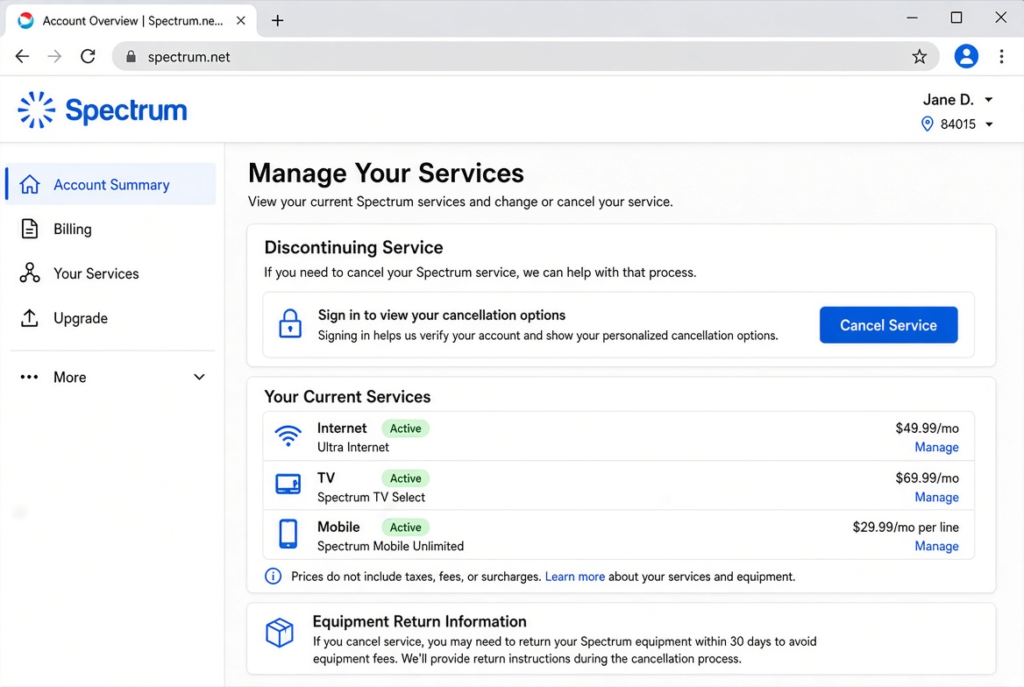
Yes, you may be able to start or manage your Spectrum internet cancellation online, depending on the options available on your account. Using your online account can save time because you can review your service details before contacting Spectrum.
Check Your Spectrum Account
Sign in to your Spectrum account and review your current internet service. If you have multiple Spectrum products, make sure you are working with the correct service.
Look through the available account and support options for a cancellation or service-change request. The exact options can vary, so follow the instructions shown in your account rather than relying on an old guide.
If Online Cancellation Is Not Available
Spectrum may not always provide a complete online cancellation option for every account. If you cannot find a way to finish the request online, use the available support option to ask Spectrum how to proceed.
You can also keep your account information ready before contacting Spectrum. This may include your account number, billing details, and preferred cancellation date.
Confirm the Service End Date
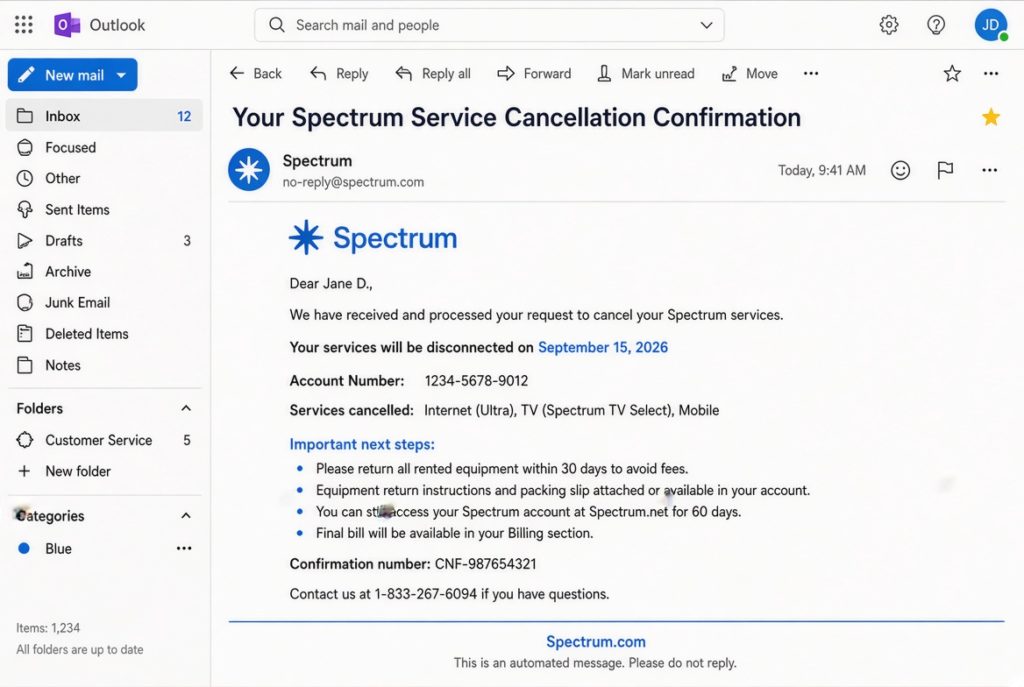
Once you submit a cancellation request, check for a confirmation message or other record showing that Spectrum received it. Save the confirmed cancellation date and any reference number.
After the service ends, review your final bill and return any required equipment. These final checks help ensure that your Spectrum internet cancellation is fully completed.
Using the My Spectrum App to Manage Your Internet Service
The My Spectrum app can make it easier to manage your internet account from your phone. If you are planning to cancel Spectrum internet, you can use the app to review your service details, check your account, and access Spectrum’s available support options before ending the connection. If you want to cancel Spectrum internet on the app, start by opening My Spectrum and signing in to your account.
After opening the app, sign in to your Spectrum account and select the internet service you currently use. Review your plan and account information so you know which service you want to discontinue. Depending on the options available on your account, you may find cancellation or support-related choices within the app.
Check Your Account Before Requesting Cancellation
Before starting the cancellation process, review your current account information. Checking your balance and recent charges can help you understand what may appear on your final bill. If you have multiple Spectrum services, such as internet and other products, make sure you are requesting changes to the correct service.
It is also worth checking whether you have any outstanding balance or equipment associated with the account. Having these details ready can make the cancellation process smoother if Spectrum asks you to provide additional information.
What If the App Does Not Let You Cancel?
The My Spectrum app may not always provide a direct option to complete an internet cancellation from beginning to end. If you cannot find a cancellation option, use the app’s support or contact features to determine how Spectrum wants you to proceed.
You may be directed to another cancellation method, such as contacting Spectrum support. In that situation, the app is still useful because you can access your account information without searching for it separately.
Keep Your Cancellation Details
Once you request cancellation, save any confirmation, reference number, or message Spectrum provides. If the service remains active or a charge appears after the requested cancellation date, this information can help when you contact Spectrum again.
Using the app before cancellation can also help you check your final account details and prepare for other steps, such as returning Spectrum equipment. The important thing is to make sure you receive clear confirmation that your internet service has actually been scheduled for cancellation.
How to Cancel Spectrum Internet Without Calling
If you prefer not to speak with a customer service representative, there are other ways to begin the process of ending your Spectrum internet service. The right option can depend on your account and the cancellation method Spectrum makes available to you.
One option is to start through your My Spectrum account or app. Sign in and review the account-management and support options available for your internet service. If a direct cancellation option is not available, Spectrum may provide instructions for completing the request through another channel.
You can also consider visiting a Spectrum store if you would rather handle the request in person. A store representative can review your account and explain what steps are available for ending your service. This can be especially useful if you also need to return Spectrum equipment.
Before You End Your Service
Have your account information ready and check your latest bill before making the request. If you are returning a modem, router, or other equipment, ask how Spectrum wants it returned and keep proof of the return.
Most importantly, make sure you receive confirmation that the cancellation request has been processed. Saving that confirmation can help if you later need to question a charge or verify your service end date.
Choosing a no-call option can save time, but you should still make sure the cancellation is officially recorded rather than assuming that submitting a request automatically ends the service.
What Is the Spectrum Internet Cancellation Number?
If you want to cancel Spectrum internet by phone, you can contact Spectrum customer support and ask a representative to close your internet service. Spectrum’s official support channels are the safest place to get the current cancellation contact information, since phone numbers and contact options can change.
When you call, explain that you want to cancel your Spectrum internet service rather than simply change or downgrade your plan. The representative may ask for information such as your account details and billing information to verify that you are authorized to make changes.
Before ending the call, ask the representative to confirm:
- The date your internet service will end
- Whether any final balance remains
- How to return Spectrum equipment
- Whether you will receive a cancellation confirmation
- What to expect on your final bill
It is also a good idea to keep the confirmation number or other proof of cancellation. If a charge appears later or your account remains active after the requested date, this information can help you resolve the issue with Spectrum.
For the most accurate Spectrum internet cancellation number, check Spectrum’s official website, your Spectrum account, or your latest bill rather than relying on an outdated third-party number.
For the latest contact options and account assistance, visit Spectrum Support.
Can You Cancel Spectrum Internet at Any Time?
Yes, you can generally request to end your Spectrum internet service when you no longer need it. However, choosing the right cancellation date is important if you are moving, switching providers, or trying to avoid a gap in your internet connection.
Before requesting cancellation, check your current billing details and decide exactly when you want the service to stop. If you are switching to another provider, it may be better to keep Spectrum active until your new connection is ready.
Plan Your Cancellation Date
Consider your billing cycle, upcoming move, new internet installation, and any equipment that needs to be returned. If other people in your household depend on the connection, make sure they know when the service is expected to end.
Once you are ready, contact Spectrum through your preferred cancellation method and clearly request that your internet service be canceled. Do not assume that stopping payment or simply disconnecting your equipment will close the account.
After making the request, ask for confirmation of the cancellation date and keep the confirmation for your records. This can help you address any billing issue that appears afterward.
If you are ready to end your service, start the Spectrum cancellation request now and confirm the exact date your internet service will be disconnected.
What Happens to Your Spectrum Account After Cancellation?
Once Spectrum processes your cancellation request, your internet service is scheduled to end according to the confirmed cancellation date. Your account does not simply disappear immediately; there may still be a final billing balance, equipment return, or other account-related tasks to complete.
Your Service Stops
On the effective cancellation date, your Spectrum internet connection should no longer be available. If you use Spectrum equipment, make sure you follow the instructions provided for returning it rather than keeping it after the service ends.
Your Final Charges Are Reviewed
Spectrum may issue a final bill showing any remaining amount owed on the account. Review this statement carefully and compare it with your previous billing information. If you notice an unexpected charge, contact Spectrum and ask for an explanation.
Keep Your Cancellation Confirmation
Save emails, messages, receipts, or confirmation numbers related to the cancellation. These records can be valuable if your account appears active after the requested cancellation date or if you receive a charge that you believe should not apply.
Once the service has ended and any outstanding account requirements have been handled, you should have a clear record that your Spectrum internet subscription is no longer active.
Post-Cancellation Checklist
After your Spectrum internet service ends, take a few minutes to make sure everything has been completed:
- Confirm that your internet service is no longer active.
- Check your final Spectrum bill for unexpected charges.
- Return any Spectrum equipment that must be sent back.
- Keep your equipment return receipt or tracking details.
- Save your cancellation confirmation and service end date.
- Check your payment method for any final charge or refund.
- Contact Spectrum if your account still shows an active internet service.
Completing these steps gives you a clear record of the cancellation and helps prevent billing or equipment issues from becoming a problem later.
Understanding Your Final Spectrum Internet Bill
After you cancel Spectrum internet, check your final bill carefully. The last statement may include charges from your remaining service period or other account activity.
Start by comparing the final bill with your previous statement. Look for your regular internet charge, taxes, equipment-related charges, credits, or any outstanding balance.
What to Check
Pay attention to the billing dates shown on the statement. Make sure they match the service period you expected. Also check whether Spectrum added any new charge after you requested cancellation.
If you already paid for something that does not appear on the final statement, look for any credit or adjustment. Contact Spectrum if you cannot understand a charge or credit.
You should also keep a copy of the final bill. It can help you resolve a billing dispute later.
Once you confirm the final amount, settle any balance that you still owe. If the statement shows a credit, check with Spectrum about how they will return that amount.
Returning Spectrum Equipment After Ending Service
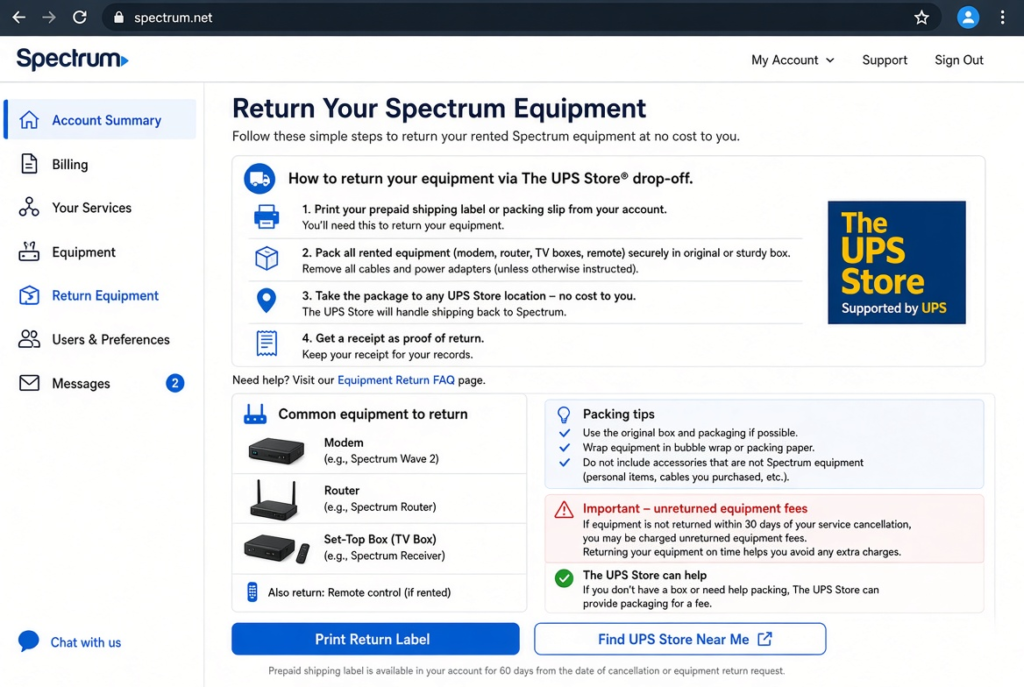
If Spectrum provided equipment for your internet service, check your account before you finish the cancellation process. You may need to return devices such as a modem, router, or other leased equipment.
Gather Everything First
Collect the Spectrum equipment from your home. Check your internet setup so you do not leave a required device behind.
Look for:
- Spectrum modem
- Wi-Fi router
- Power adapters
- Other Spectrum-provided devices
Do not include your own equipment unless Spectrum specifically asks you to return it.
Choose the Return Method
Spectrum can provide instructions for returning its equipment. Depending on your situation, you may have options such as returning the equipment to a Spectrum store or using another return method offered by the company.
Follow the instructions linked to your account or cancellation request. Avoid sending equipment to an address you found on an old website or from an unrelated source.
Keep Proof of the Return
This step matters after you cancel Spectrum internet. Keep your receipt, tracking number, or other proof until Spectrum confirms that it received the equipment.
If Spectrum later says that you did not return a device, your receipt or tracking information can help you show when and how you returned it.
Once Spectrum confirms the return, keep that confirmation with your cancellation records. This gives you a complete record of both the service cancellation and the equipment return.
Can Spectrum Internet Customers Get a Refund?
A refund may depend on your account balance, payments, and the terms that apply when you end your Spectrum service. Canceling your internet does not automatically mean you will receive money back.
Your final statement should show whether you still owe Spectrum or whether your account has a credit. Review the billing dates and compare them with your previous payments. This can help you spot an incorrect charge or an unused balance.
If your account shows a credit after cancellation, contact Spectrum to ask how they handle the amount. Keep your final bill and any cancellation confirmation available during the conversation.
When You Should Question a Charge
Contact Spectrum if your final bill includes a charge you did not expect. Explain the issue and provide the relevant billing or cancellation details.
For example, you may want to ask about:
- A charge after your confirmed cancellation date
- An unexpected equipment charge
- A duplicate payment
- An account credit that has not appeared as expected
Do not assume that every post-cancellation charge qualifies for a refund. Review the final account statement first, then ask Spectrum to explain anything that does not look correct.
What If Your Spectrum Cancellation Does Not Go Through?
Sometimes a cancellation request may not finish as expected. Your account could still show active service, or you might receive another bill after you asked Spectrum to end your internet plan.
If this happens, start by checking the cancellation confirmation you received. Look for the requested service end date and any reference number. These details can help Spectrum locate your original request.
Check These Details First
Before contacting support again, make sure you have:
- Your Spectrum account information
- The date you requested cancellation
- Any confirmation or reference number
- Your latest bill
- Equipment return records, if applicable
If the service remains active after the confirmed date, contact Spectrum and explain the situation. Give the representative your cancellation details and ask them to review the account.
You should also review any new charges that appear after your original request. If you believe a charge resulted from a failed cancellation, ask Spectrum to investigate it.
Keep a Record of the Resolution
Once Spectrum fixes the issue, request updated confirmation. Save any messages, emails, receipts, or reference numbers connected to the case.
If the problem involves equipment, keep your return tracking information as well. A clear record can make future billing or account disputes much easier to resolve.
Taking these steps can help you complete the process if your first attempt to cancel Spectrum internet does not go through.
Frequently Asked Questions
Can I Cancel Spectrum Internet at a Spectrum Store?
You can ask a Spectrum store representative about ending your internet service. A store visit can also be useful if you need to return Spectrum equipment.
How Long Does Spectrum Internet Cancellation Take?
The timing can vary based on your account and the cancellation request. Ask Spectrum to confirm the exact date when your internet service will end.
Can I Cancel Spectrum Internet If I’m Moving?
Yes, moving can be a reason to end your current service. Before you cancel, check whether Spectrum offers service at your new address. Transferring your service may suit you better if you want to keep Spectrum.
Do I Have to Return My Spectrum Equipment?
If Spectrum provided equipment for your internet plan, you may need to return it after cancellation. Follow the return instructions Spectrum gives you and keep proof of the return.
How Can I Confirm My Spectrum Internet Is Canceled?
Check the cancellation confirmation from Spectrum and review your account for the service end date. You should also check your final bill to make sure the account reflects the cancellation.
Conclusion
Canceling your Spectrum internet service becomes easier when you plan the process in advance. Review your account, choose a suitable end date, and select the cancellation method that works best for you.
After you cancel Spectrum internet, do not forget about the final steps. Check your final bill, return any required equipment, and save your cancellation confirmation.
If a problem appears after cancellation, contact Spectrum with your account records and request a review. Keeping your bills, receipts, and confirmation details can help you resolve issues quickly.
With these steps, you can complete your Spectrum internet cancellation with fewer surprises and keep a clear record of what happened to your account.