Introduction
If you no longer want to use Netflix, canceling your subscription is usually a quick process. You can cancel your Netflix subscription online from a phone, tablet, or computer without deleting your Netflix account.
In this guide, you’ll learn how to cancel Netflix subscription in 2026, including the steps for mobile and desktop users. We’ll also explain what happens after cancellation, how to confirm that your membership has ended, and whether you can get a refund for a recent payment.
Whether you want to cancel because you’re not using Netflix anymore, want to cut monthly expenses, or simply want to take a break, the steps below will help you cancel your membership correctly and avoid unexpected charges.
How to Cancel Netflix Subscription in 2026
Canceling a Netflix subscription is straightforward, but the exact steps can depend on how you originally signed up. In most cases, you can manage the cancellation directly through your Netflix account.
Before you begin, make sure you are signed in to the Netflix account you want to cancel. You do not need to delete your profile or remove your viewing history to end the subscription.
Steps to Cancel Your Netflix Subscription
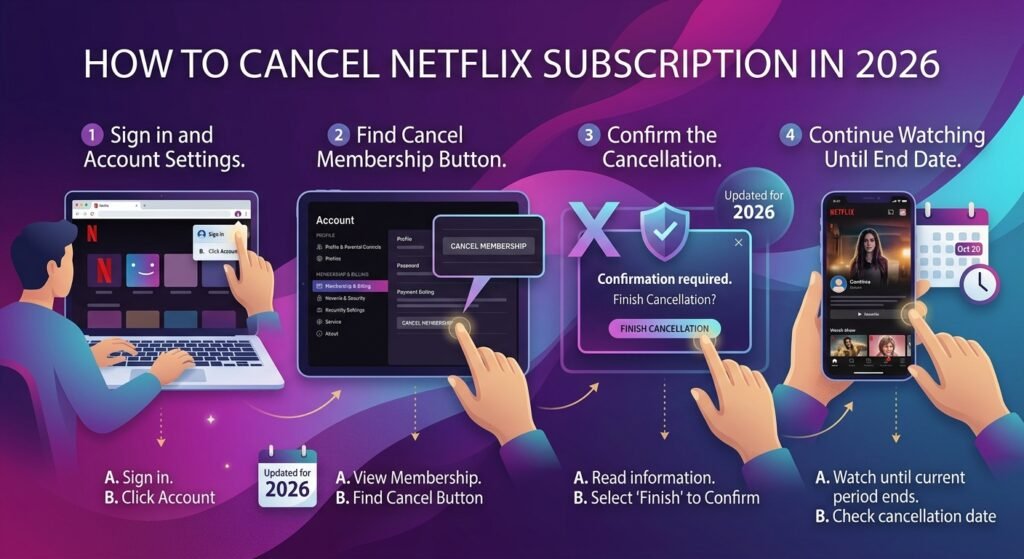
- Sign in to Netflix
Open Netflix in your web browser and log in to your account. - Open your account settings
Select your profile icon, then choose Account to view your membership and billing details. - Find the cancellation option
Look for the membership or subscription section. If Netflix manages your billing directly, you should see an option to cancel your membership. - Select Cancel Membership
Follow the on-screen instructions and continue through the cancellation process. - Confirm the cancellation
Netflix may ask you to confirm your decision or provide a reason for leaving. Complete the final confirmation step.
After you cancel, Netflix should show the date when your current billing period ends. You can generally continue watching until that date, rather than losing access immediately.
If you don’t see a cancellation option, another provider, such as Apple, Google, or a different payment partner, may bill you for Netflix. In that case, you’ll need to cancel it through the provider that handles your billing.
Before You Cancel Netflix, Check These Things
Before you cancel your Netflix subscription, it helps to check a few details so you know exactly what will happen after cancellation. In most cases, canceling stops future billing but does not immediately remove your access.
Check Your Next Billing Date
Open your Netflix account and check your membership or billing information. Knowing your next billing date helps you understand when the next payment would normally be charged.
If you cancel before the next billing date, you can generally continue using Netflix until the end of your current paid billing period.
Find Out How You’re Being Billed
Netflix does not directly bill every subscriber. Depending on how you signed up, Apple, Google, or another third-party provider may handle your payments.
If Netflix does not provide a direct cancellation option in your account, check the billing information shown in your account. You may need to manage the subscription through the company handling your payments.
Download Anything You Need
Netflix does not let you download your entire account or viewing history for offline storage after your membership ends. If you have important account information you want to keep, check your account before canceling.
You can also review your profiles, watch history, or other account details beforehand if you may want to use them again later.
Remember Your Account Is Not Automatically Deleted
Canceling your membership is different from deleting your Netflix account. Your subscription can end while your account and certain account information remain associated with Netflix.
This can be useful if you decide to restart your Netflix subscription later instead of creating a completely new account.
Taking a minute to check these details before cancellation can help you avoid confusion about your billing date, access, and payment method.
How to Cancel Netflix Subscription on Mobile
If you want to cancel Netflix subscription on mobile, you can usually manage the process from your phone without using a computer. However, the exact method depends on how you signed up and who bills you for Netflix.
For most users, the simplest approach is to open Netflix in a mobile browser, sign in, and check the Account section. If Apple, Google, or another third-party service handles your subscription, you may need to cancel it through that service instead.
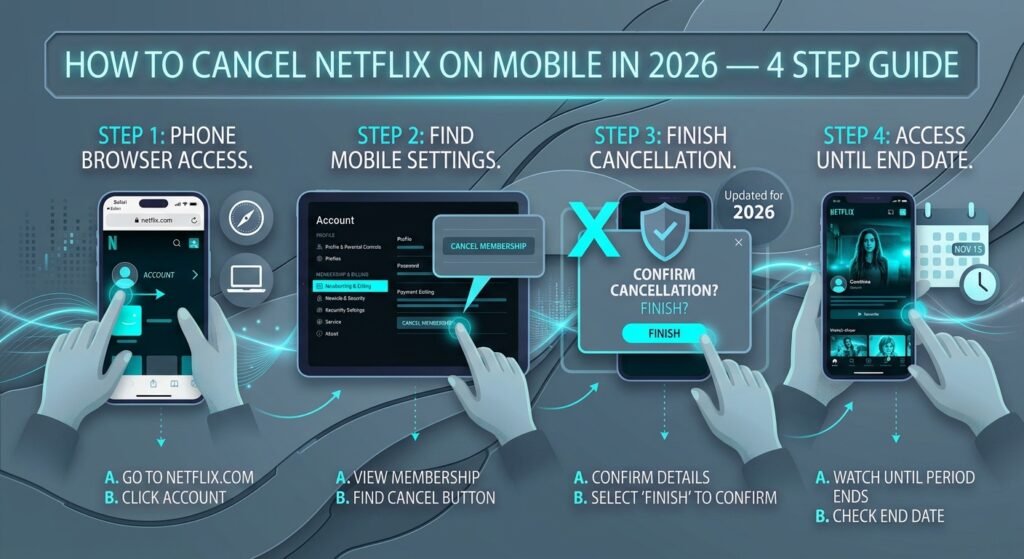
Cancel Netflix Subscription Using Your Phone Browser
If Netflix bills you directly, follow these steps to cancel your membership from your phone:
- Open your mobile browser
Launch Chrome on Android or Safari on iPhone and go to the official Netflix website. - Sign in to your Netflix account
Enter the email address or phone number and password associated with the membership you want to cancel. - Open your Account page
Tap your profile icon or account menu, then select Account. This is where you can view your membership and billing information. - Find the cancellation option
Look for the membership section and check whether Cancel Membership or a similar cancellation option is available. - Start the cancellation process
Tap the cancellation option and read the information Netflix provides about your membership end date. - Confirm that you want to cancel
Follow the on-screen instructions and finish the cancellation process. - Check the cancellation information
Afterward, check your account or confirmation email to make sure you canceled the subscription successfully.
Can You Cancel Netflix From the Mobile App?
This is where many users get confused. You may not always be able to cancel a Netflix membership directly from the Netflix app.
The cancellation process depends on your billing arrangement. If Netflix manages your subscription directly, your account page may direct you to manage the membership through Netflix. If you subscribed through another company, that company may control the cancellation.
So, if you open the Netflix app and cannot find a Cancel Membership option, don’t keep searching through the app menus. Instead, sign in through a mobile browser and check your account and billing information.
Canceling Netflix on an iPhone or iPad
If Netflix bills you directly, manage your membership from your Netflix account page.
However, if you subscribed through Apple and Apple handles the billing, you need to cancel the subscription through your Apple account rather than canceling it from Netflix. You can check your Apple subscriptions from your device’s subscription settings.
This distinction is important because deleting the Netflix app from your iPhone does not cancel the subscription. Removing an app only removes the app from the device; it does not normally stop recurring billing.
Canceling Netflix on Android
Android users should also first check how the Netflix membership is billed.
If Netflix handles the billing, follow the cancellation process from your Netflix account in a mobile browser. If Google manages your subscription, cancel it through the Google account or subscription settings linked to your membership.
Again, simply uninstalling the Netflix app is not the same as canceling your membership.
What Happens After You Cancel on Mobile?
Canceling from a phone does not necessarily mean that your Netflix access ends immediately. If you have already paid for the current billing period, Netflix generally allows you to keep watching until the end of that period.
After cancellation, look for the membership end date or cancellation confirmation. This gives you a clear indication that the recurring subscription has been stopped.
If you receive another charge after the cancellation date, first check whether Netflix processed the payment before the cancellation took effect and whether another provider handled the billing.
Can’t Find the Cancel Option on Your Phone?
If you’re trying to cancel Netflix subscription online but the cancellation option isn’t available, check your billing details before assuming that Netflix is preventing cancellation.
Your membership may have been started through a third-party provider. In that situation, Netflix may tell you which company manages the payment, and you will need to follow that provider’s cancellation process.
The key point is simple: cancel the subscription with the company that is actually billing you. Once you’ve canceled, keep the confirmation or note the membership end date so you can verify that future recurring payments should stop.
Check Netflix’s Official Cancellation Guide
For the latest cancellation instructions, you can also check Netflix’s official Help Center. It’s useful if your account shows different options or you’re unsure who manages your billing.
Cancel Netflix Subscription on a Desktop or Laptop
If you prefer using a computer, you can usually cancel Netflix subscription online through your account settings. The process is similar to mobile cancellation, but the account menu is easier to navigate on a larger screen.
Steps to Cancel Netflix on a Computer
- Go to the official Netflix website and sign in to your account.
- Click your profile icon in the top-right corner.
- Select Account from the menu.
- Find the Membership & Billing section.
- Select Cancel Membership if the option is available.
- Review the information Netflix shows about your cancellation.
- Follow the prompts and confirm that you want to cancel.
After completing the process, Netflix should provide information about when your current membership period ends. Keep this date in mind because you may still have access to Netflix until the end of your paid period.
What If You Don’t See “Cancel Membership”?
If there is no cancellation option in your Netflix account, your subscription may be billed through another provider. This can happen when you originally signed up through a third-party service.
Check the billing information in your account to find out who manages your subscription. You may then need to cancel the membership through that provider instead of Netflix.
Also, remember that signing out of Netflix or deleting the Netflix app does not cancel your subscription. You need to complete the actual cancellation process with the company handling your billing.
What Happens When You Cancel Netflix?
Canceling your Netflix membership does not usually mean that your account disappears immediately. In most cases, your subscription simply stops renewing, while you can continue using Netflix until the end of the current billing period.
You Can Usually Keep Watching
If you cancel after you’ve already paid for the current month, Netflix generally allows you to keep watching until your paid service period ends. For example, if your next billing date is August 30 and you cancel on August 20, you may still have access until August 30.
Your exact end date can vary depending on your billing arrangement, so check the cancellation confirmation or your Netflix account for the date shown there.
If you want to learn more about keeping access after canceling a subscription, check out our guide on How to Cancel a Subscription and Keep Access Until It Expires.
You Won’t Be Charged for the Next Billing Period
Once you complete the cancellation, Netflix should not automatically renew your membership for another billing cycle. This is why it is important to finish the cancellation process rather than simply deleting the app or signing out.
If you are trying to cancel Netflix subscription before your next payment, completing the cancellation before the renewal date can help prevent the next recurring charge.
Your Netflix Account Is Not the Same as Your Subscription
Canceling your membership and deleting your Netflix account are two different things. Cancellation stops the paid membership, while your account may remain available for a period of time.
If you decide to return to Netflix later, you may be able to restart your membership instead of creating a completely new account.
What About Your Profiles and Viewing History?
Canceling does not necessarily mean that everything associated with your Netflix account disappears instantly. Netflix may keep your profiles and viewing-related information for a period of time, depending on its account policies and how long your account remains inactive.
If you think you may return to Netflix later, keeping the account rather than trying to delete everything can make restarting your membership easier.
How to Confirm Your Netflix Subscription Is Canceled
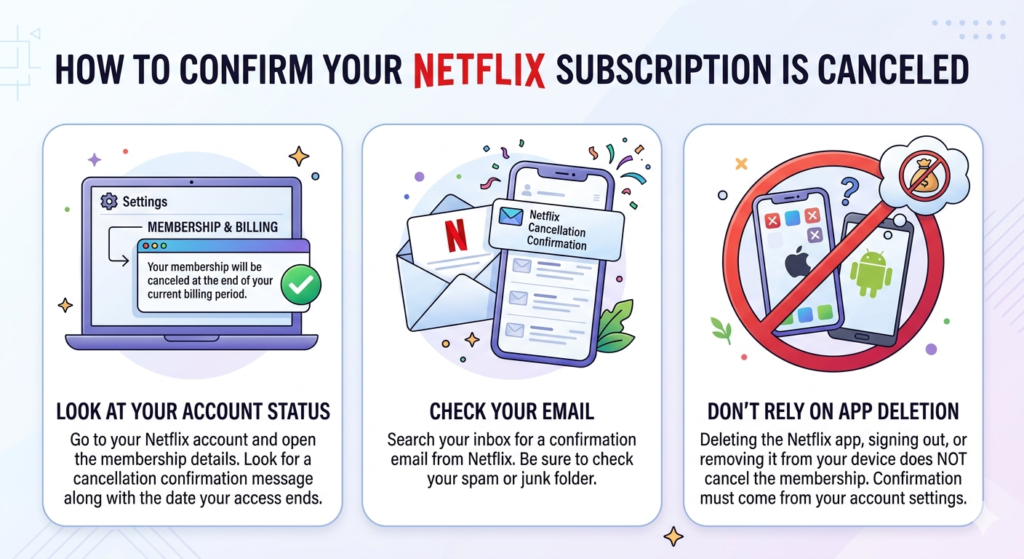
Once you cancel your Netflix subscription, take a moment to verify that the membership is actually set to end. You don’t need to cancel it again if your account already shows a cancellation date.
Look at Your Account Status
Go to your Netflix account and open the membership details. If Netflix shows a message confirming cancellation along with the date your access ends, your subscription is no longer scheduled to renew.
Check Your Email
A cancellation confirmation may also be sent to the email address connected to your Netflix account. Search your inbox for Netflix and check your spam or junk folder if you can’t find the message.
Don’t Rely on App Deletion
Deleting the Netflix app, signing out, or removing Netflix from your phone does not cancel the membership. The important thing is that your account or billing provider confirms that the subscription has been canceled.
If you subscribed through Apple, Google, or another provider, check that provider’s subscription page as well. This gives you an extra confirmation that future recurring payments should stop.
Can You Cancel Netflix Subscription and Get a Refund?
Canceling your Netflix membership and getting a refund are two different things. When you cancel Netflix subscription, the cancellation generally prevents the membership from renewing, but it does not automatically mean that your latest payment will be refunded.
Will Netflix Refund Your Last Payment?
In general, Netflix does not automatically provide a refund simply because you canceled your membership. In general, Netflix does not automatically provide a refund simply because you canceled your membership.
However, if you believe Netflix charged you incorrectly or you have another payment issue, contact Netflix Support and explain your situation.
What If You Were Charged After Canceling?
If you notice a charge after you canceled, first check the date and amount of the payment. Make sure Netflix did not process the charge before your cancellation took effect.
You should also check whether someone else uses your payment method for a separate Netflix account or whether a third-party provider manages your subscription.
How to Ask Netflix About a Refund
If you believe you qualify for a refund, contact Netflix through its official customer support options. Have your account and payment details available so the support team can review the transaction.
Keep in mind that refund decisions can depend on the circumstances of the charge and the billing method used.
If you’re specifically searching for how to cancel Netflix subscription and get a refund, the safest approach is to cancel the membership first if you no longer want it, then contact the appropriate billing provider about any payment you believe should be refunded.
Canceling Netflix Through Apple, Google, or Another Provider
Sometimes Netflix is not the company that handles your recurring payment. If you signed up through Apple, Google, a mobile provider, or another partner, you may need to cancel the subscription through that provider.
Check Who Bills You
Start by opening your Netflix account and reviewing the membership or billing information. If Netflix tells you that your subscription is managed by another company, that provider is where you need to complete the cancellation.
This matters because canceling through the wrong place may leave the subscription active.
Apple Subscriptions
If Apple manages your Netflix billing, open your Apple account’s subscription settings and look for Netflix. Select the subscription and follow the cancellation instructions shown there.
Afterward, check that the subscription status shows the cancellation or an upcoming expiration date.
Google Play Subscriptions
If Google manages your Netflix subscription, open your Google Play subscription settings and find Netflix. Choose the cancellation option and complete the confirmation steps.
Remember that uninstalling the Netflix app from an Android phone does not cancel a subscription billed through Google.
Other Billing Providers
Some Netflix memberships may be connected to a mobile carrier, internet provider, or another billing partner. In these cases, follow that provider’s cancellation process or contact its support team if you cannot find the option yourself.
Once you have canceled through the correct provider, keep the confirmation details. This can be useful if you need to verify the cancellation or question a later charge.
What to Do If You’re Still Charged After Canceling
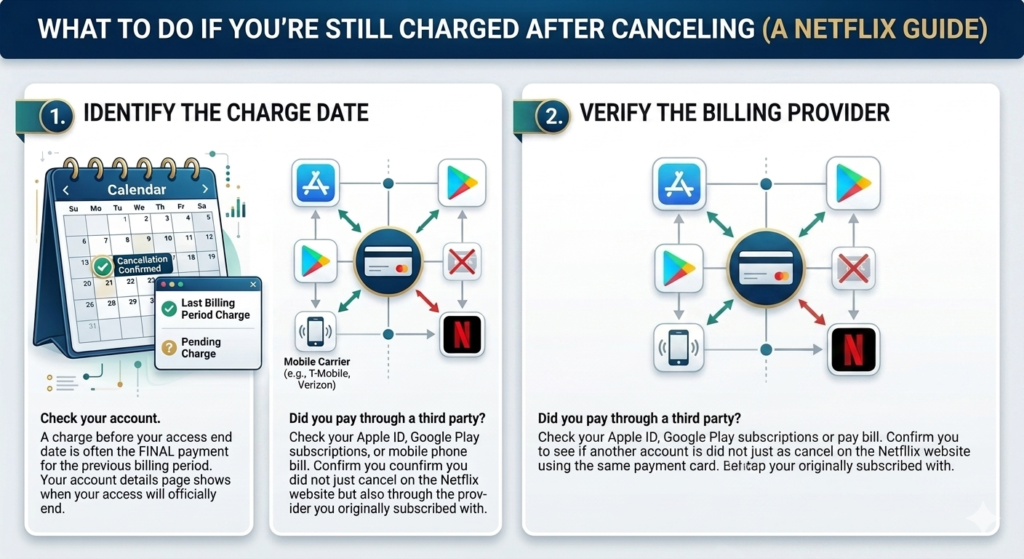
Seeing a Netflix charge after you have canceled can be worrying, but it does not always mean the cancellation failed. The first step is to check when the charge was made and who processed it.
If you made the payment before completing your cancellation, it may simply be the final charge for your previous billing period. Your Netflix account should show the membership status and, where applicable, the date your access ends.
If you see a charge after confirming your cancellation, check whether another Netflix account uses the same payment method. Also, check whether Apple, Google, a mobile carrier, or another billing provider manages your subscription.
Still Can’t Explain the Charge?
If you have checked your account and the payment still looks incorrect, contact Netflix or the company that processed the payment. Keep your cancellation confirmation, payment date, and transaction details available so the support team can investigate the charge.
Most importantly, don’t cancel your card or block payments before checking the source of the charge. Identifying the actual billing provider can make it much easier to resolve the issue.
Frequently Asked Questions About Netflix Cancellation
Can I cancel Netflix anytime?
Yes. You can cancel your membership whenever you want. If you’ve already paid for the current billing period, you can generally continue watching until that period ends.
Does deleting the Netflix app cancel my subscription?
No. Removing the app from your phone or computer does not cancel your membership. You need to complete the cancellation through Netflix or the provider that handles your billing.
Can I cancel Netflix from my phone?
Yes. You can manage your membership from a mobile browser. If Apple, Google, or another provider bills you for Netflix, you may need to cancel the subscription through that provider instead.
Will Netflix charge me after I cancel?
If you cancel your membership before the next renewal, Netflix generally won’t charge you for another billing period. Always check your cancellation status to make sure Netflix won’t renew your membership.
Can I restart Netflix after canceling?
Yes. If you decide to return later, you can generally restart your membership by signing in to your existing Netflix account and choosing an available membership option.
Can I get a refund after canceling Netflix?
Canceling does not automatically guarantee a refund. If you believe Netflix charged you incorrectly or you have another billing issue, contact Netflix or the company that processed the payment to discuss your situation.
How do I know if my Netflix subscription is canceled?
Check your Netflix account for a cancellation confirmation or membership end date. You can also look for a confirmation email. If another provider manages your billing, check the subscription status there as well.
Conclusion
Canceling a Netflix subscription is usually a simple process once you know who manages your billing. Whether you’re using a phone, desktop, or a third-party payment provider, the most important step is to complete the cancellation and then verify that it was successful.
Before you leave, check your Netflix account status, note your membership end date, and keep any cancellation confirmation. If Netflix already charged you and you believe you qualify for a refund, contact Netflix or the relevant billing provider to discuss the charge.
By following these steps, you can cancel Netflix subscription online confidently and avoid unwanted future renewals