Introduction
If you signed up for Instacart+ but no longer want to pay for the membership, canceling the subscription can help prevent future renewal charges. You do not necessarily need to delete your Instacart account just because you want to stop your membership.
The cancellation process can be slightly different depending on where you purchased Instacart+. Someone who subscribed directly through Instacart may manage the membership from their Instacart account, while a subscription purchased through Apple or Google Play may need to be canceled through the corresponding subscription system.
In this guide, you will learn how to cancel an Instacart subscription, how to cancel Instacart+ from different devices, what to do with a free trial, how to check whether the cancellation worked, and what happens to your account after you cancel.
What Is Instacart+?
Instacart+ is Instacart’s paid membership program. Depending on the current plan and applicable terms, members can receive benefits related to delivery fees, service fees, and other offers when they place eligible orders.
The membership is separate from your basic Instacart account. This distinction is important because canceling the membership does not automatically mean that you need to stop using Instacart.
You can still have an Instacart account after ending your Instacart+ membership and continue using the service under the conditions that apply to non-members.
Before canceling, check your account to see the benefits, billing information, and renewal date associated with your current membership.
What to Know Before Canceling Instacart+
Before you start the cancellation process, take a moment to check your subscription details. This can make the process easier and help you understand what will happen after cancellation.
Check Your Next Billing Date
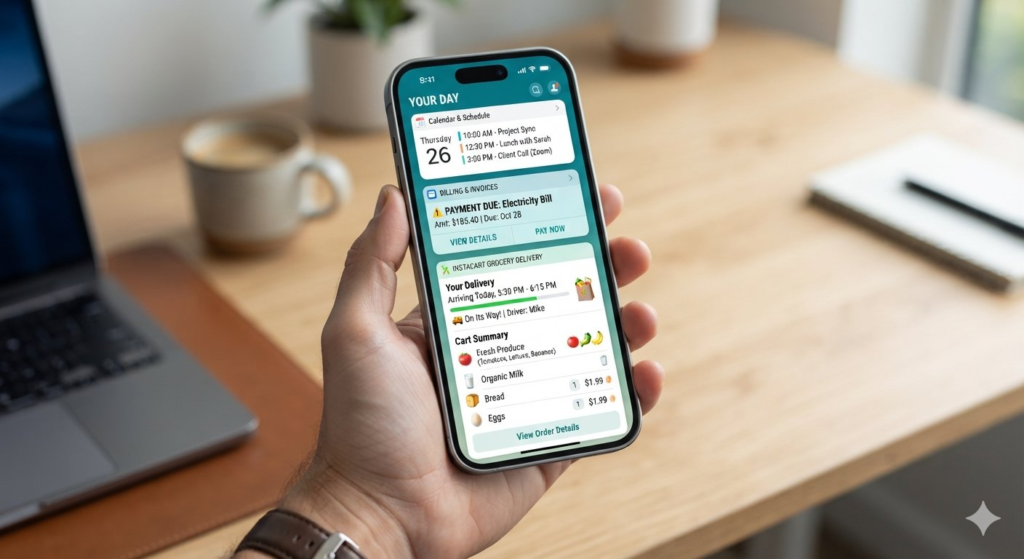
If you’re looking for how to cancel an Instacart subscription through the app, you can manage your Instacart+ membership from your account settings.
The exact timing can depend on how you purchased the subscription, so the date shown in your account or billing platform should be your main reference.
Find Out Where You Subscribed
One of the most common reasons people cannot find the cancellation option is that they are looking in the wrong place.
Your subscription might have been purchased:
- Directly through Instacart
- Through Apple’s subscription system
- Through Google Play
- Through another supported billing method
If you know where you originally started the membership, you can usually identify where to manage it.
Canceling Is Not the Same as Deleting Your Account
You do not normally need to delete your Instacart account just because you want to cancel Instacart+.
If you still want to order groceries through Instacart occasionally, canceling the paid membership lets you keep your account while ending the recurring membership.
Save Confirmation Information
After cancellation, look for a confirmation message or updated membership status. If you receive an email confirming the cancellation, it can be useful to keep it until the membership ends.
This gives you a record of the request if you later need to check your billing history.
How to Cancel an Instacart Subscription
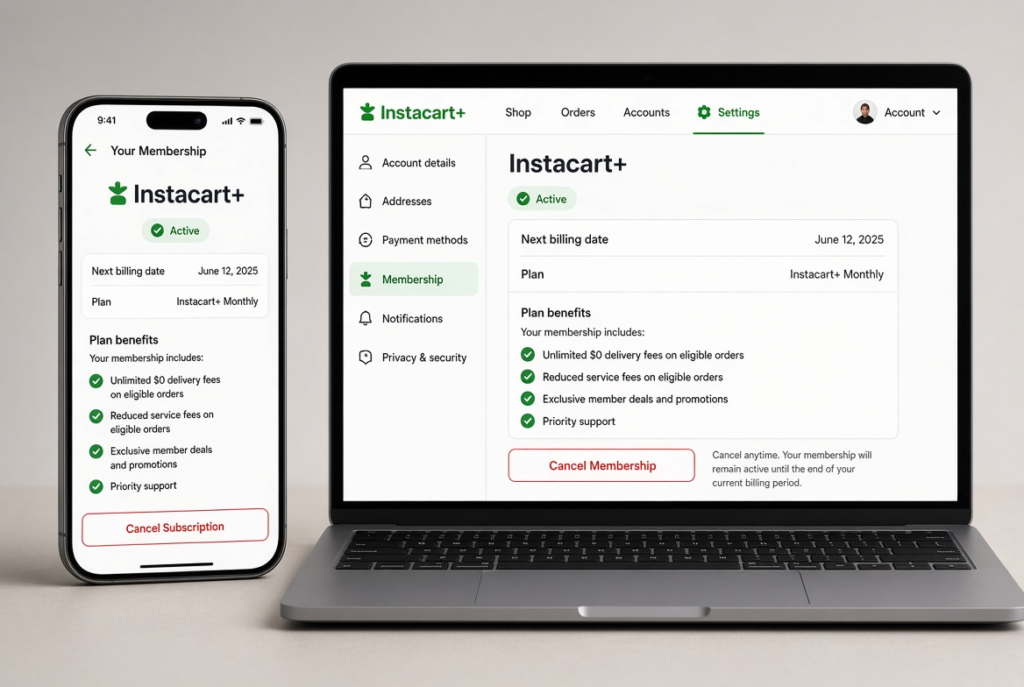
If you subscribed directly through Instacart, start by signing in to the account connected to your Instacart+ membership.
The general process is:
- Open Instacart’s website.
- Sign in to your Instacart account.
- Open your account or profile settings.
- Find the section for Instacart+ or your membership.
- Select the option to manage your membership.
- Look for the cancellation option.
- Follow the instructions displayed on the screen.
- Confirm that you want to cancel the membership.
After completing the steps, return to the membership page and check the status.
The wording of buttons and menus can change as Instacart updates its website. If the exact labels are different from the ones above, look for options related to membership, manage, renewal, or cancel.
What If You Do Not See a Cancel Button?
Do not immediately assume that cancellation is unavailable.
First, confirm that you are signed into the correct Instacart account. If you have more than one account, the subscription may be connected to another email address.
Next, check whether you purchased the membership through Apple or Google Play. In that situation, the subscription may be managed through the platform where the purchase was originally made.
If you still cannot locate the membership, use Instacart’s official support resources rather than entering your payment information on an unrelated cancellation website.
How to Cancel Instacart+ in the App
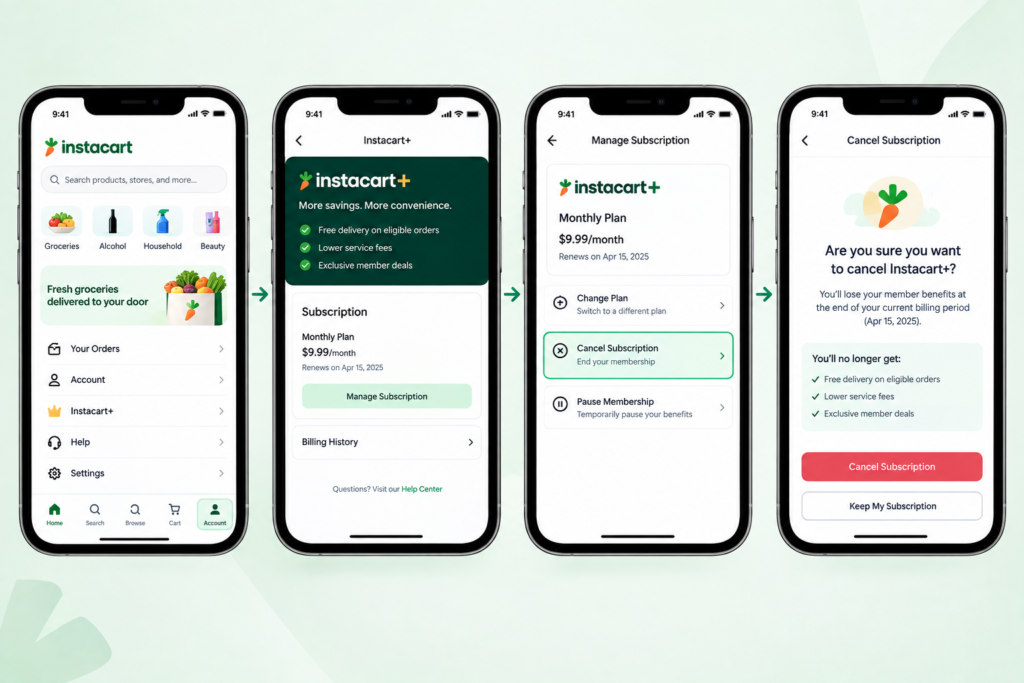
If you normally use Instacart from your phone, you can begin by opening the app and signing into the account associated with your membership.
From there, open your account or profile area and look for your Instacart+ membership details. Select the option that lets you manage the membership and follow the cancellation instructions provided.
Because app layouts can change between versions, you may see slightly different labels or menu locations.
A Simple Checklist
When using the Instacart app, check for:
- Your account or profile section
- Instacart+ membership details
- Membership management options
- Renewal or billing information
- Cancellation instructions
- A final confirmation of the cancellation
Do not close the app immediately after selecting a cancellation option. Make sure you complete the final confirmation step if one is displayed.
How to Cancel Instacart+ on an iPhone
If you subscribed through Apple’s subscription system, you may need to cancel Instacart+ from your iPhone’s subscription settings.
The steps for how to cancel an Instacart subscription on an iPhone depend on where you originally purchased the membership.
Try the following:
- Open Settings.
- Tap your Apple Account name.
- Select Subscriptions.
- Find Instacart in the list.
- Open the Instacart subscription.
- Choose the available cancellation option.
- Follow the confirmation steps.
Afterward, return to the subscription list and check its status.
If Instacart does not appear in your Apple subscriptions, that does not necessarily mean that you do not have an Instacart+ membership. It may simply mean that the subscription was purchased directly through Instacart or another billing method.
In that situation, sign in to Instacart and check your membership settings.
Why the Purchase Method Matters
When you cancel a subscription, you generally need to manage it through the service that controls the recurring payment.
For example, if Apple handles the subscription, changing settings inside the Instacart app may not be enough. Likewise, if the subscription was purchased directly from Instacart, looking only in Apple’s subscription list may not show it.
This is why checking the original purchase method can save time.
How to Cancel Instacart+ on Android
Android users can check Google Play if the Instacart+ membership was purchased through Google Play.
A typical process is:
- Open the Google Play Store.
- Tap your profile picture.
- Select Payments & subscriptions.
- Open Subscriptions.
- Look for Instacart.
- Select the subscription.
- Choose the available cancellation option.
- Follow the instructions to confirm.
Once again, the exact menu names can change as Google updates its services.
If Instacart does not appear in your Google Play subscriptions, check your Instacart account directly.
If Instacart Is Missing From Google Play
There are several possible explanations.
You may have:
- Used a different Google account
- Purchased Instacart+ directly through Instacart
- Used another billing method
- Already canceled the subscription
- Signed into an Instacart account that is not connected to the membership
Check your email receipts and account information if you are unsure which account or platform was used.
How to Cancel an Instacart Free Trial
If you started an Instacart+ free trial, check the date when the trial is scheduled to end.
Free trials can transition into paid memberships under the applicable subscription terms if they are not canceled before the renewal date. Therefore, if you already know that you do not want to continue, it is better to review the cancellation option before the trial expires.
Canceling a Trial Through Instacart
If you started the trial directly through Instacart, sign in and open your Instacart+ membership settings.
Look for information about your current trial and its renewal date. If a cancellation option is available, follow the displayed instructions and complete the confirmation process.
Canceling a Trial Through Apple or Google
If the trial was started through Apple or Google Play, check the subscription section on the relevant platform.
The important thing is to cancel it through the system that manages the subscription.
Afterward, verify the status so you know whether the trial is still scheduled to renew.
What Happens After You Cancel Instacart+?
Canceling a membership does not necessarily mean that all Instacart+ benefits disappear immediately.
Depending on the applicable subscription terms and how you purchased the membership, your benefits may remain available until the end of the current billing period.
For example, if you have already paid for a membership period and cancel before the next renewal, you may continue to have access to the membership during the remaining period.
Your account itself can remain active.
Will You Lose Your Instacart Account?
No. Canceling Instacart+ and deleting an Instacart account are separate actions.
If you only want to stop the recurring membership, there is generally no reason to delete your entire account.
You can continue using the account for Instacart orders according to the terms that apply to customers without an Instacart+ membership.
What About Future Charges?
The purpose of canceling a recurring subscription is to stop future renewals. However, you should check the cancellation confirmation and the subscription status shown by the billing platform.
If you see an upcoming renewal after you believe you canceled, review the subscription details and confirmation information before assuming that the cancellation was successful.
After canceling Instacart+, you may continue using your membership benefits until the current billing period ends. If you manage other subscriptions too, see our guide on how to cancel an Amazon subscription for another step-by-step cancellation process.
Can You Still Use Instacart After Canceling the Subscription?
Yes, canceling your paid membership does not mean you have to stop using Instacart altogether.
You can continue to use your Instacart account for eligible orders, although the fees and benefits available to you may differ without an active Instacart+ membership.
This distinction is useful for people who use Instacart only occasionally. You may decide that paying for a recurring membership no longer makes sense while still wanting the option to place an order from time to time.
Your account, order history, and other account information are separate from the Instacart+ membership itself.
What Happens to Your Membership Benefits?
The benefits associated with Instacart+ may depend on the current membership terms and your billing period.
After cancellation, check the membership information in your account for the date when your current benefits are scheduled to end.
Do not assume that cancellation means immediate removal of every benefit. Likewise, do not assume that the benefits will continue indefinitely.
The membership status and expiration information shown in your account are the best place to confirm what applies to your specific subscription.
What to Do If You Cannot Cancel Instacart+
Sometimes the cancellation process is straightforward, but you may not see the expected option.
Start with the basics.
1. Check the Correct Account
If you have more than one email address or Instacart account, make sure you are using the account that originally purchased the membership.
2. Check Your Billing Platform
If the subscription was purchased through Apple or Google Play, check that platform’s subscription settings.
3. Check Your Membership Status
You may already have canceled the subscription. If so, the account may show an expiration date instead of a cancellation button.
4. Check for a Different Subscription
Make sure you are looking at the correct membership. A different account or payment method can make the subscription difficult to locate.
5. Contact Official Support
If you still cannot identify or cancel the membership, use Instacart’s official support options.
Avoid giving your account or payment details to an unofficial website that claims to cancel the subscription for you.
How to Check If Your Instacart Subscription Is Canceled
After you complete the cancellation process, verification is an important final step.
Open the membership section again and look for information showing that the subscription will not renew.
You might see:
- A cancellation confirmation
- An upcoming membership end date
- A message that the subscription is no longer set to renew
- An email confirming the cancellation
The exact wording can vary depending on how you subscribed.
Keep Your Confirmation
If Instacart or your billing platform sends you a confirmation email, save it temporarily.
This can be useful if you later notice a charge and need to review when the cancellation was submitted.
You can also take a screenshot of the cancellation status if that is convenient.
How to Check Your Instacart Billing History
If you are unsure whether a recent payment was for Instacart+, check your available billing or purchase records.
The payment may appear under Instacart or, depending on where you subscribed, under the relevant app store or payment provider.
Reviewing your billing history can help you identify:
- When the membership started
- When the latest payment occurred
- Which account was charged
- When the next renewal was expected
- Whether a cancellation has already been processed
This information can be especially helpful if you have more than one Instacart account.
Can You Cancel Instacart+ After Being Charged?
If a renewal has already been processed, canceling the membership can prevent future renewals, but it does not automatically mean that the latest payment will be refunded.
Refund eligibility can depend on the circumstances, purchase method, and applicable terms.
If you believe you were charged unexpectedly, review the transaction details and contact the appropriate support channel.
For current information about Instacart’s policies, refer to the official Instacart Help Center.
Can You Get a Refund After Canceling Instacart+?
Cancellation and refunds are two different processes.
Canceling a subscription generally concerns future renewal, while a refund concerns a payment that has already been processed.
Whether a refund is available can depend on factors such as the purchase method, timing, and applicable terms.
If you believe you qualify for a refund, check the relevant billing platform and Instacart’s current support information. Do not assume that canceling the membership automatically reverses a previous payment.
How to Avoid an Unwanted Instacart+ Renewal
If you only wanted to try Instacart+ temporarily, keep track of the renewal date from the beginning.
A few simple habits can help:
- Check the trial or billing end date when you subscribe.
- Decide whether you want to continue before the renewal date.
- Cancel through the platform that manages the subscription.
- Confirm the cancellation after submitting it.
- Keep the confirmation email or screenshot.
- Check your payment history if you are unsure whether a renewal occurred.
These steps can make subscription management easier, especially when you use several services with different billing systems.
Instacart Subscription vs. Instacart Order Cancellation
It is important not to confuse these two actions.
Canceling an Instacart subscription means ending the recurring Instacart+ membership.
Canceling an Instacart order means stopping a particular grocery or delivery order.
They are different processes and can have different rules.
If your goal is to stop the recurring membership charge, search for the Instacart+ membership settings rather than the order cancellation option.
This distinction is especially important because searches for “cancel Instacart” can refer to either a membership or an individual order.
Frequently Asked Questions
How do I cancel my Instacart subscription?
Sign in to the Instacart account connected to your membership, open the Instacart+ settings, and follow the available cancellation instructions. If you subscribed through Apple or Google Play, manage the subscription through that platform.
Can I cancel Instacart+ anytime?
You can generally request cancellation before the next renewal. Check the membership details for your current billing period and renewal date.
Does canceling Instacart+ stop it immediately?
Not necessarily. Depending on your subscription terms, your membership may remain active until the end of the current billing period.
Can I still use Instacart after canceling?
Yes. Canceling Instacart+ is different from deleting your Instacart account. You can generally continue using Instacart without the paid membership.
How do I cancel Instacart+ before the free trial ends?
Open the account or subscription platform where you started the trial and cancel before the displayed renewal date. Afterward, verify that the trial or membership is no longer scheduled to renew.
Can I get a refund after canceling Instacart+?
A cancellation does not automatically guarantee a refund. Refund eligibility depends on the circumstances and applicable terms.
Why can’t I find Instacart in my subscriptions?
You may have purchased the membership directly through Instacart, used another Apple or Google account, or already canceled it. Check your Instacart account and purchase records.
How can I tell if my Instacart subscription is canceled?
Check your Instacart+ membership status or the subscription platform where you purchased it. Look for a cancellation confirmation or an end date showing that the membership will not renew.
Do I need to delete my Instacart account to cancel Instacart+?
No. Canceling the paid membership and deleting your Instacart account are separate actions. If you only want to stop the membership, you do not necessarily need to delete your account.
Conclusion
Canceling an Instacart subscription is usually straightforward once you know where the membership is managed. If you subscribed directly through Instacart, you can check your Instacart+ settings, while subscriptions purchased through Apple or Google Play may need to be canceled through those platforms.
Before finishing, check your renewal date, complete the cancellation confirmation, and verify that the membership is no longer set to renew. You can also keep using your Instacart account after canceling Instacart+ if you still want to place occasional orders without the membership.