introduction
Canceling a subscription does not always mean losing access immediately. In many cases, you can cancel your subscription today and continue using the service until the end of your current billing period.
This can be useful if you no longer want to be charged for the next billing cycle but still want to use the features you have already paid for. However, the exact process depends on the service, subscription type, and where you purchased it.
In this guide, you’ll learn how to cancel a subscription and keep access until it expires, what happens after cancellation, how to check your expiration date, and what to do if your access ends immediately.
Can You Cancel a Subscription and Keep Access?
Yes, in many cases, you can cancel a subscription and keep access until the end of your current billing period.
When you cancel, you are usually turning off automatic renewal, not ending your paid access immediately. For example, if your subscription renews on September 15 and you cancel it on September 5, you may continue using the service until September 15.
After the current subscription period ends, your access will usually expire and you will not be charged for another billing cycle.
However, this is not guaranteed for every service. Some providers may end access immediately after cancellation, especially if their terms state that cancellations take effect right away. Always check the cancellation screen or the provider’s terms before confirming.
What Happens After You Cancel?
Depending on the service, you may see a message such as:
- Your subscription is canceled.
- Your plan will not renew.
- You can continue using the service until [date].
- Your subscription ends on [date].
The most important detail is the expiration or end date. If the service shows a future date, you can generally continue using your paid features until that date.
How to Cancel a Subscription Without Losing Your Remaining Access
If you want to stop future charges but continue using the service you have already paid for, the safest approach is to cancel the subscription before the next renewal date.
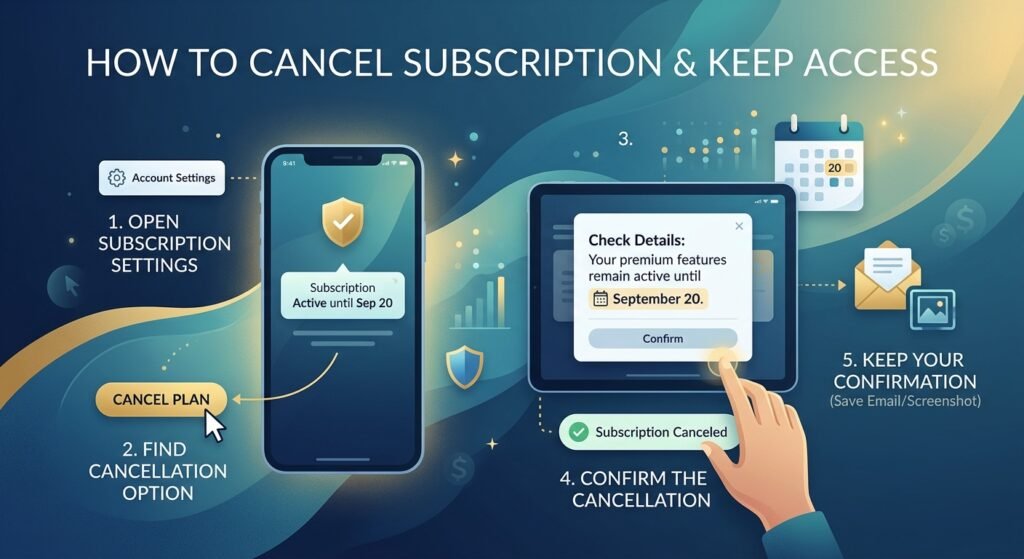
1. Open Your Subscription Settings
Sign in to the website or app where you purchased the subscription. Look for options such as Account, Billing, Membership, or Subscriptions.
2. Find the Cancellation Option
Open your active subscription and select Cancel Subscription, Cancel Plan, or a similar option. Some services may first ask why you are leaving or offer you a discount to stay.
3. Check the Cancellation Details
Before confirming, read the message carefully. Look for a statement showing when your access will end.
For example, if the screen says:
“Your subscription has been canceled. You can continue using Premium features until September 20.”
you have successfully stopped the next payment while keeping access through September 20.
4. Confirm the Cancellation
Complete the final cancellation step. Do not assume that closing the app or removing your payment method cancels the subscription.
Afterward, check your account to make sure the subscription shows Canceled, Ending, or Expires on [date].
Keep Your Confirmation
Save the cancellation email or take a screenshot showing the cancellation and expiration date. This can be useful if you are charged again or have a dispute about when you canceled.
Tip: Canceling a subscription does not always mean you receive a refund for unused time. In many cases, you simply keep access until the period you already paid for ends.
What Happens to Your Subscription After You Cancel?
The word “cancel” can be confusing because it does not always mean your subscription ends at that exact moment.
In most cases, cancellation simply stops the subscription from renewing. Your account remains active until the date you have already paid for.
For example, imagine you subscribe to a streaming service on August 1 and your plan renews monthly. If you cancel on August 18, you may still have access until August 31. On September 1, the subscription will expire instead of renewing.
| Situation | What Usually Happens |
|---|---|
| Cancel before the renewal date | Future renewal is stopped |
| Paid period is still active | Access usually continues |
| Current billing period ends | Paid access usually expires |
| Subscription is already expired | Premium features may be removed |
The important thing to remember is that cancellation and expiration are two different events. Cancellation prevents the next charge, while expiration marks the end of your remaining paid access.
However, some services handle cancellations differently. If the cancellation screen says your access ends immediately, check the provider’s refund policy before confirming.
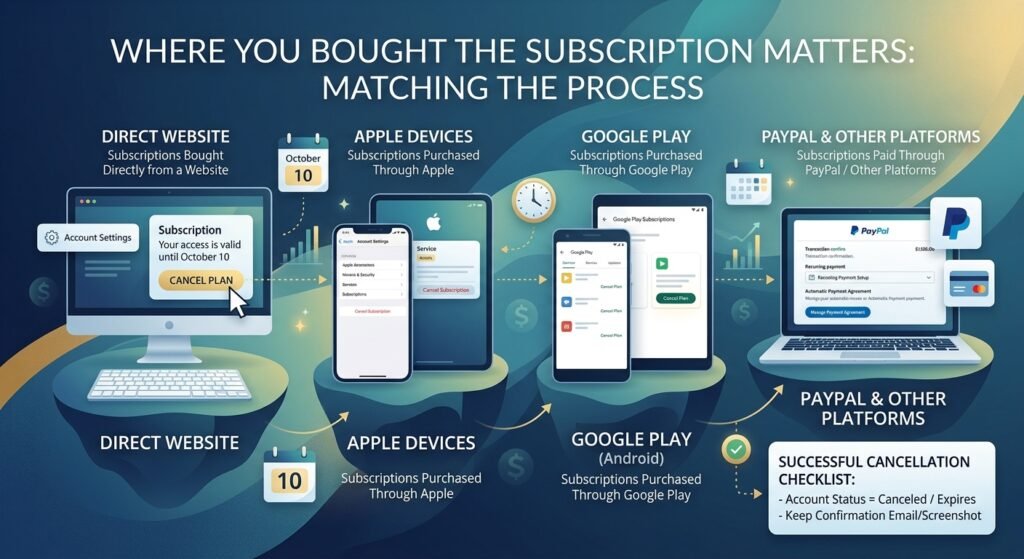
Where You Bought the Subscription Matters
The way you cancel a subscription depends largely on where you purchased it. A subscription that you bought directly from a company’s website may have a different cancellation process from one purchased through Apple, Google Play, PayPal, or another platform.
Knowing where the subscription is managed can save you time and prevent a common mistake: thinking you have canceled a subscription when you have only removed the app or changed your payment method.
Subscriptions Bought Directly From a Website
If you signed up on the company’s website, you will usually need to cancel the subscription from your account.
Start by signing in and opening sections such as Account, Settings, Billing, Membership, or Subscription. Select your active plan and look for an option such as Cancel Subscription, Cancel Plan, or Turn Off Auto-Renewal.
Before confirming, pay attention to the information on the cancellation page. Many services will tell you exactly when your paid access will end.
For example, you might see:
“Your subscription has been canceled. You will have access to Premium features until October 10.”
In this situation, the subscription is no longer set to renew, but you can continue using the paid features until October 10.
Subscriptions Purchased Through Apple
If you subscribed through an iPhone or iPad using Apple’s subscription system, you generally need to manage the subscription through your Apple Account.
Go to your device’s subscription settings, select the service, and choose the cancellation option. After confirming, check whether Apple displays an expiration date.
Simply deleting the app from your iPhone does not normally cancel an active subscription. The recurring subscription is separate from the app installed on your device.
Subscriptions Purchased Through Google Play
Android subscriptions purchased through Google Play are generally managed through your Google Play account.
Open your subscriptions section, select the service, and follow the cancellation instructions. After canceling, check the subscription details to see whether you can continue using the service until the current billing period ends.
Again, uninstalling the app is not the same as canceling the subscription. You must complete the cancellation through Google Play or the provider that manages the billing.
Subscriptions Paid Through PayPal
Some services allow customers to use PayPal for recurring payments. In these cases, there can be two separate things to consider: canceling the subscription with the service and managing the automatic payment agreement in PayPal.
If the provider’s website has a cancellation option, use that first. Then check your PayPal account if you need to confirm that the recurring payment agreement has been stopped.
Do not rely on simply removing PayPal as a payment method. A subscription may remain active unless you properly cancel it.
How to Know You Canceled It Successfully
After canceling, look for a confirmation email or a message in your account. A successful cancellation may show wording such as Canceled, Expires on [date], Ends on [date], or Auto-renewal turned off.
Keep the confirmation until your access expires and the next billing date has passed. If a provider charges you unexpectedly, having the cancellation date and confirmation can make it easier to contact customer support.
The most important thing is to identify who is actually managing your subscription. Once you know where the subscription was purchased, you can cancel it from the correct place while keeping access for the remaining paid period when the provider allows it.
How to Check How Long You Will Keep Access
After you cancel a subscription, one of the most important things to check is the date when your current access will end. This tells you whether you can continue using the service and how much time remains on your plan.
Many services display this information immediately after cancellation. Instead of simply showing Canceled, your account may say something like “Active until September 25” or “Your plan ends on September 25.”
Check Your Account Page
Sign in to the service and open your account or subscription settings. Look for the current plan and its status.
If the subscription says Canceled but active until a future date, you normally do not need to take any additional action. Your recurring billing has been stopped, while your existing access remains available until the displayed date.
Look for the Next Billing Date
The billing date can help you understand when your subscription would normally renew. If you cancel before that date, the provider may allow you to continue using the service until the end of that billing cycle.
For example, suppose your plan normally renews on August 30. You cancel it on August 18, and the service says your access ends on August 30. You can generally continue using the subscription until August 30 without being charged for another month.
Keep in mind that the exact timing can vary between providers.
Check Your Email for Confirmation
Many subscription services send an email after you cancel. The email may include:
- The date you canceled
- The date your current access ends
- Confirmation that automatic renewal is disabled
- Information about refunds or remaining access
If you do not receive an email, check your account directly rather than assuming the cancellation failed.
What If You Cannot Find an Expiration Date?
Some services do not clearly display the exact expiration date after cancellation. In that situation, check your original receipt or billing information to determine when the current subscription period started and when it was scheduled to renew.
You can also contact the provider’s support team and ask them to confirm two things: whether automatic renewal has been canceled and the exact date your access will end.
Keeping a record of this information is useful because it prevents confusion later. You will know when your access should stop and can also verify that you were not charged for another billing period.
What If Your Access Ends Immediately After Cancellation?
Not every subscription works the same way. Although many services let you continue using paid features until the end of your billing period, some providers may remove access as soon as you cancel.
If you expected to keep access but your account changed immediately, do not assume that something went wrong. First, check the provider’s cancellation and refund terms.
Three Common Outcomes
You keep full access.
The subscription is canceled, but all paid features remain available until the expiration date.
You keep limited access.
Some services allow you to use the account but remove certain premium features immediately.
Your access ends immediately.
The provider may treat cancellation as an immediate termination. Whether you are eligible for a refund for unused time depends on the company’s policy.
Before You Cancel
If keeping access is important, check the cancellation screen before clicking the final confirmation button.
Pay particular attention to phrases such as:
“You will have access until…”
or
“Your subscription will end immediately.”
These messages can tell you what will happen before you commit to the cancellation.
If the provider offers separate choices such as Cancel at the end of the billing period and Cancel immediately, choose the option that matches your needs.
If You Lost Access Unexpectedly
Start by checking whether you canceled the correct plan or account. Then review your confirmation email and account status.
If you paid for unused time and the provider’s policy allows refunds, contact customer support and explain when you canceled and when your access ended. Include your cancellation confirmation or receipt if requested.
The key is to check the provider’s rules before canceling rather than assuming every service will let you use the remaining paid time.
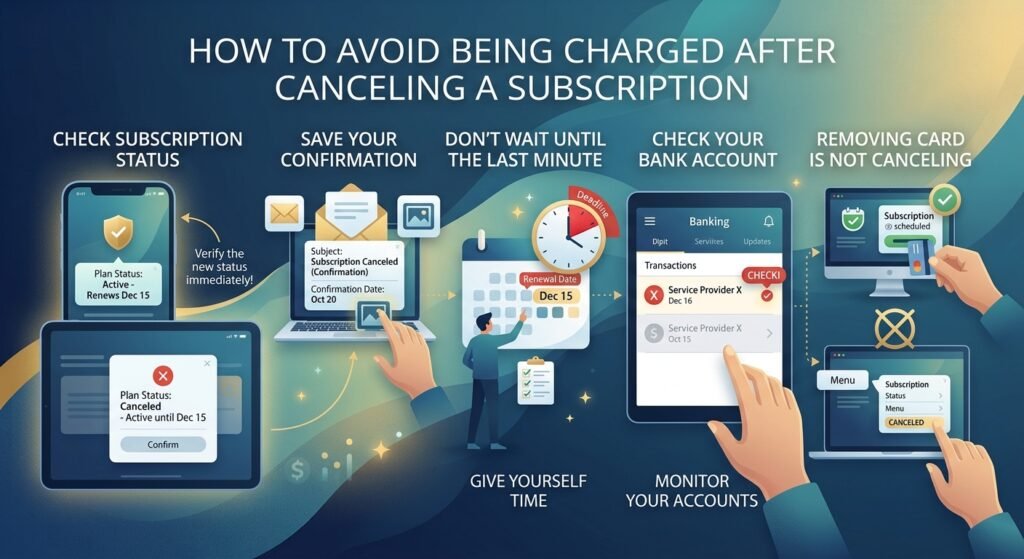
How to Avoid Being Charged After Canceling a Subscription
Canceling a subscription is only part of the process. You should also make sure the cancellation was completed correctly so that another payment does not go through.
A few simple checks can help you avoid an unwanted renewal.
Check the Subscription Status
After canceling, return to your account’s subscription or billing page. The status should no longer indicate that the plan is scheduled to renew.
If you see Active – Renews on [date], the cancellation may not have been completed.
On the other hand, wording such as Canceled – Active until [date] usually means the recurring payment has been stopped while your existing access remains available.
Save Your Cancellation Confirmation
Keep the confirmation email, receipt, or screenshot showing that you canceled the subscription. Make sure the record includes the date whenever possible.
This can be especially useful if the provider later claims that the subscription was still active.
Don’t Wait Until the Last Minute
If you already know that you do not want another billing cycle, cancel before the renewal date rather than waiting until the final hours.
Some providers have specific cancellation deadlines, and payment processing may begin around the scheduled renewal time. Giving yourself extra time also allows you to contact support if the cancellation option is not working.
Check Your Bank or Payment Account
After the subscription expires, keep an eye on your bank, credit card, or payment account for the next expected billing period.
If you notice a charge after you have successfully canceled, first compare the charge date with your cancellation confirmation. Then contact the provider and provide your cancellation details.
Removing Your Card Is Not the Same as Canceling
One common mistake is removing a saved payment method and assuming the subscription has been canceled.
That does not necessarily stop the subscription. A provider may have another payment method available, or the account may remain scheduled for renewal.
Always cancel the subscription itself and then verify its status. This gives you a much better chance of stopping future charges while keeping access to the service for the remaining period you have already paid for.
Can You Still Use a Subscription After Canceling It?
In many cases, yes. If the provider allows access until the end of the current billing period, canceling only stops the next renewal.
This means you can continue using the features included in your plan even though the subscription is marked as canceled.
What You Can Usually Do
While your paid period is still active, you may be able to:
- Use premium features normally
- Watch or download available content
- Access saved files or account features
- Use remaining credits, depending on the service
- Continue using the subscription until the displayed expiration date
However, some services may place restrictions on certain features after cancellation. The exact rules depend on the provider.
Your Cancellation Does Not Usually Remove Your Account
Another important distinction is between canceling a subscription and deleting an account.
Canceling normally stops recurring billing while your account remains available. Deleting the account is a separate action and may remove your data, settings, history, or other information.
If you want to keep using the service until your paid period ends, avoid deleting your account unless the provider specifically tells you that doing so will not affect your remaining access.
What Happens When the Expiration Date Arrives?
Once the paid period ends, the service may automatically move your account to a free plan, remove premium features, or restrict access completely.
For example, a streaming service may remove access to its paid catalog, while a software subscription may switch your account to a limited version.
Your account itself may remain active even after the paid subscription expires. This means you can often sign in later if you decide to subscribe again.
Before the expiration date, download anything you are entitled to keep if the provider’s rules allow it. This is especially important for cloud storage, software projects, or other services where losing premium access could affect your files or features.
Common Mistakes to Avoid When Canceling a Subscription
A subscription can sometimes continue billing simply because the cancellation process was not completed correctly. Avoiding a few common mistakes can make the process much easier.
Assuming Uninstalling an App Cancels the Subscription
Removing an app from your phone does not normally cancel the subscription connected to it. The recurring payment may continue even though the app is no longer installed.
Always cancel the subscription through the service, Apple, Google Play, or whichever platform manages the payment.
Canceling the Wrong Account
If you have more than one account with the same provider, make sure you are canceling the account that actually has the paid subscription.
Check the email address, plan name, and billing details before confirming.
Ignoring the Final Confirmation Screen
Some services require more than one step to complete cancellation. You might select Cancel, answer a survey, and then need to confirm your decision again.
Do not close the page until you see a clear cancellation confirmation.
Assuming Cancellation Means an Automatic Refund
Canceling a subscription and getting a refund are usually two different things.
You may be allowed to keep using the service until the end of the period you already paid for without receiving money back for the unused days. Refund eligibility depends on the provider’s terms and, in some cases, the platform through which you purchased the subscription.
Forgetting About Free Trials
Free trials can automatically turn into paid subscriptions when the trial period ends. If you do not want to continue, check the trial’s renewal date and cancel it according to the provider’s instructions.
Do not wait until the last minute if you already know you will not use the paid plan.
Not Keeping Proof of Cancellation
A confirmation email or screenshot can provide useful evidence if a billing problem occurs later.
Save the confirmation until you are sure the subscription has expired and no additional renewal charge has appeared.
By checking the subscription status, expiration date, and cancellation confirmation, you can stop future billing while making the most of the access you have already paid for.
Frequently Asked Questions About Canceling a Subscription
Will I lose access immediately after canceling a subscription?
Not necessarily. Many services allow you to keep using the subscription until the end of the current billing period. However, some providers may end access immediately, so check the cancellation message before confirming.
Can I cancel a subscription before the renewal date?
Yes. In fact, canceling before the next renewal date is usually the safest way to prevent another charge. If the provider allows continued access, you can keep using the service until your current paid period ends.
Does canceling a subscription mean I get a refund?
No. Cancellation generally stops future renewals but does not automatically mean you will receive a refund for unused time. Refund rules vary by provider and purchase platform.
How do I know if my subscription is really canceled?
Check your account’s subscription or billing section. A message such as “Canceled,” “Auto-renewal off,” or “Expires on [date]” can indicate that future billing has been stopped. You should also look for a cancellation confirmation email.
Can I use premium features after canceling?
If the provider keeps your subscription active until the end of the paid period, you can usually continue using the premium features during that time. Access may be limited immediately for some services.
What if I cannot find the cancel button?
First, check where you originally purchased the subscription. If you subscribed through Apple or Google Play, you may need to cancel it through the relevant app-store subscription settings rather than the service’s website.
If you still cannot find the option, contact the provider’s customer support and ask them to confirm how the subscription is managed.
What happens when the subscription expires?
The provider may move your account to a free plan, remove premium features, or restrict access. Your account itself may remain active, depending on the service.
Should I delete my account to stop future charges?
Usually, no. Deleting an account and canceling a subscription are different actions. Cancel the recurring subscription first and verify that it will not renew. Deleting the account without checking the subscription status could also affect your access to information you want to keep.
Can I cancel a subscription on the same day it renews?
You can usually request cancellation at any time, but if the renewal payment has already been processed, canceling may only prevent the next renewal. Whether you can receive a refund depends on the provider’s refund policy.
How long should I keep my cancellation confirmation?
Keep it until the subscription has expired and you have confirmed that no additional renewal charge was made. If there is ever a billing dispute, the confirmation can help show when you canceled.
Conclusion
Canceling a subscription does not always mean losing access immediately. With many services, you can turn off automatic renewal and continue using the paid features until your current billing period expires.
The key is to check where the subscription is managed, complete the cancellation process, and confirm the exact date your access will end. Keep your cancellation email or confirmation as proof, especially if you want to avoid unexpected charges later.
If you want to cancel a subscription and keep access, canceling before the next renewal date can be a practical approach when the provider allows continued access. Just remember that every service has its own cancellation, access, and refund policies, so always check the final confirmation carefully.
Once you know your expiration date and have confirmed that auto-renewal is turned off, you can continue using the service for the remaining time you have already paid for without worrying about the next automatic renewal.