

Introduction
Sent a Venmo payment by mistake? You may be able to cancel it, but Venmo does not let you cancel every payment after you send it. Your options depend on the payment status and whether Venmo has already completed the transaction.
If you entered the wrong amount, sent money to the wrong person, or simply changed your mind, check the payment details before taking any further action. A pending payment may give you different options from a completed payment.
This guide explains what you can do in each situation, including payments sent to the wrong person, payments to inactive accounts, and requests for refunds.
In this guide, you’ll learn:
- How to cancel a Venmo payment.
- What to do if your payment is still pending.
- What happens when you send money to the wrong person.
- How refunds work when you cannot cancel a payment.
Can You Cancel a Venmo Payment?
Yes, you may be able to cancel a Venmo payment, but only if Venmo still gives you a cancellation option. Once a payment has been completed, you usually cannot cancel it directly.
The first thing to do is check the payment status in your Venmo account. A pending payment can have different options from a completed payment, so don’t assume that every transaction works the same way.
When You May Be Able to Cancel
You may see a cancellation option when:
- The payment is still pending.
- The recipient has not accepted or claimed the payment.
- Venmo provides a Cancel option for that specific transaction.
If the option appears, you can follow the instructions in the app to stop the payment.
When You Usually Cannot Cancel
If the payment already shows as completed, Venmo generally does not provide a simple Cancel button. At that point, your next step depends on why you want the money back.
For example, if you sent money to the wrong person, you may need to contact the recipient and ask them to return it. If the payment involved a purchase or you believe there is a problem with the transaction, you may need to use Venmo’s available support or dispute options.
Check Before Sending Another Payment
If you canceled a payment because you entered incorrect information, wait until Venmo clearly shows that the original transaction is canceled.. Sending the money again too quickly could create confusion or result in duplicate payments.
Tip: If you want to cancel a Venmo payment, check its status first. That one step can tell you whether direct cancellation is still possible or whether you need another solution.
How to Cancel a Venmo Payment
If Venmo shows a Cancel option for your payment, you can usually stop the transaction directly from the payment details. Check the payment status first, then follow the cancellation steps shown in the app.
Steps to Cancel the Payment
- Open the Venmo app and sign in.
- Go to your transactions/activity and find the payment.
- Open the payment details and look for the Cancel Payment option.
- Follow the instructions to confirm the cancellation.
After you finish, open the transaction again and check its status. Make sure Venmo has updated the payment before you assume the cancellation is complete.
If the Cancel Option Is Missing
If you cannot find a cancellation button, Venmo may not allow you to cancel that particular payment. This can happen when Venmo has already completed the payment or when the transaction does not support direct cancellation.
Don’t try to stop the payment by simply deleting the Venmo app or removing your payment method. Those actions do not automatically cancel a transaction that you have already sent.
Check These Details Before You Cancel
Before confirming anything, make sure you have selected the correct payment. Check:
- Recipient: Make sure you are viewing the payment you actually want to stop.
- Amount: Confirm the amount shown in the transaction.
- Status: Check whether the payment is pending or completed.
- Cancellation message: Read any notice Venmo shows before confirming.
Once the cancellation is processed, check your transaction history again. Keeping a record of the payment can also help if the money does not return as expected.
Can You Cancel a Pending Venmo Payment?
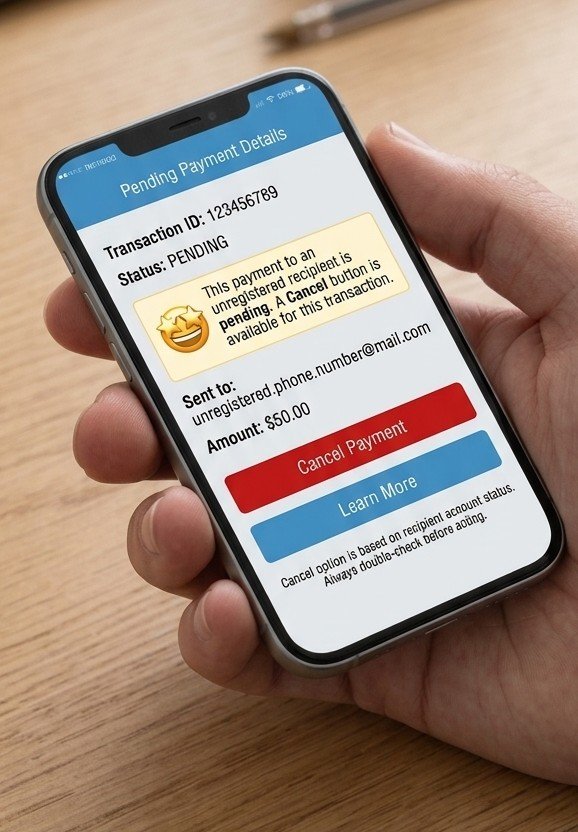
You can cancel a pending Venmo payment only in certain situations, such as when you send money to an unregistered email address or phone number. If the recipient is an active Venmo user, Venmo generally sends the payment instantly, so you won’t see a Cancel button.
When the Cancel Option Appears
If you sent the payment to an unregistered email address or phone number, Venmo may leave the transaction pending instead of completing it.
In this situation, you can check your Activity tab. If Venmo shows a Cancel button for the transaction, you can use it to stop the payment.
You can cancel a pending Venmo payment only in certain situations, such as when you send money to an unregistered email address or phone number.
How to Check for the Option
Open Venmo and go to your Activity. Find the pending payment and open its details.
If you see Cancel, select it and follow the instructions displayed by Venmo. Afterward, check the transaction again to confirm that the payment has been canceled.
What If There Is No Cancel Button?
If you sent the payment to an active Venmo user, don’t expect a Cancel button even if you made a mistake. Venmo generally completes payments to active users instantly.
If you sent money to the wrong active user, your options are different: you can send them a Request asking them to return the money, or contact Venmo Support for assistance.
Important: Don’t assume that every payment marked pending can be canceled. Check the recipient’s account status and the options Venmo actually displays for that specific transaction.
Can You Cancel a Venmo Payment After Sending It?
If you send money to an active Venmo user, you generally cannot cancel the payment after sending it because Venmo sends these payments instantly. You won’t find a direct Cancel button for an ordinary completed payment sent to an active account.
Why You Cannot Cancel It
Venmo is designed to send payments quickly between active users. Once the payment reaches an active recipient, you cannot simply open the transaction and reverse it yourself.
This is different from a payment sent to an unregistered email address or phone number. Those payments can remain pending because the recipient does not have a registered Venmo account.
What to Do Instead
If you sent the payment to an active user and realize afterward that it was a mistake, don’t send another payment or try to cancel the transaction through your bank.
Instead, you have two practical options:
- Send a Request: Open the recipient’s Venmo profile and request the same amount. Explain that you sent the original payment by mistake.
- Contact Venmo Support: If the recipient does not return the money or you need help with the transaction, contact Venmo Support and provide the payment details.
Check the Recipient Before Sending Money
Because an active Venmo payment can go through immediately, always double-check the recipient before tapping Pay. Confirm their username, name, and the amount before completing the transaction.
Taking a few seconds to review the details can help you avoid sending a payment to the wrong person.
What If You Sent a Venmo Payment to the Wrong Person?
If you accidentally send money to an active Venmo user, you generally cannot cancel the payment directly. Because Venmo sends the payment instantly, you need to ask the recipient to return the money or contact Venmo Support for help.
Send a Request to the Recipient
The first option is to send the recipient a Request for the same amount you accidentally paid.
When sending the request, add a short note explaining that the original payment was sent by mistake. If the person recognizes the mistake and agrees to help, they can send the money back to you.
Contact Venmo Support
If the recipient does not respond, refuses to return the money, or you believe there is another issue with the transaction, contact Venmo Support.
Keep the payment information available, including the amount, date, recipient, and transaction details. This gives Venmo the information it needs to understand what happened.
Don’t Send Another Payment
Avoid sending another transaction to the same person while trying to fix the first one. That can make the situation more confusing and could result in additional money being sent.
Instead, keep the original transaction and use the Request feature or Venmo Support to try to recover the amount.
Check the Recipient Carefully Next Time
Before making another Venmo payment, take a moment to verify:
- Username or profile: Make sure it belongs to the intended person.
- Name: Check the displayed name before confirming.
- Amount: Confirm that you entered the correct amount.
- Payment note: Use a clear note so you know what the payment was for.
If you sent money to the wrong active user, there is no simple cancellation button to undo the payment. Acting quickly and contacting the recipient is usually the most practical first step.
If the recipient does not return the money, you can contact Venmo Support and provide the payment details so they can review the situation.
Can You Cancel a Venmo Payment to an Inactive Account?
Yes, you may cancel a Venmo payment sent to an unregistered account if Venmo shows a Cancel option for that transaction. This can happen when you send money to an email address or phone number that does not have a registered Venmo account.
Why the Payment Stays Pending
When the recipient does not have a registered Venmo account, the payment may not be completed immediately. Instead, it can remain pending while Venmo waits for the recipient to claim or register the account.
This differs from sending money to an active Venmo user, because Venmo generally sends those payments instantly and does not let you cancel them directly.
How to Cancel the Payment
Check your Activity tab and open the pending transaction. If Venmo provides a Cancel button, select it and follow the instructions shown on the screen.
After completing the process, return to your Activity and check the transaction status to make sure the cancellation went through.
What If You Don’t See a Cancel Button?
Don’t assume that a payment can be canceled simply because it appears pending. The available options depend on the specific transaction.
If there is no Cancel button, review the payment details and contact Venmo Support if you need help determining what happened.
Check Before Sending Another Payment
If you sent the payment to an unregistered phone number or email address by mistake, don’t immediately send another payment. First confirm whether the original transaction is still pending and whether Venmo gives you the option to cancel it.
This helps you avoid accidentally creating another payment while the first transaction is still unresolved.
Can You Get a Refund for a Venmo Payment?
A refund may be possible, but it depends on the type of payment and the reason you need your money returned. If you sent money to an active Venmo user by mistake, you cannot simply cancel the completed payment and automatically receive a refund.
If You Paid the Wrong Person
When money has already been sent to an active user, the practical first step is to contact the recipient. You can send them a Request for the amount you accidentally paid and explain the situation.
If they agree to return the money, they can send the amount back to you through Venmo.
If the Recipient Does Not Return the Money
When the recipient does not respond or refuses to return the payment, contact Venmo Support and explain what happened.
Have your transaction details ready, including the payment amount, date, recipient, and any relevant information about the transaction. Venmo can then determine what options may be available for your particular situation.
If the Payment Was for a Purchase
If you used Venmo to pay for something and there is a problem with the purchase, the process can be different from an accidental payment to a friend.
Check the transaction details and Venmo’s available support or dispute options. Keep any receipts, messages, order information, or other records related to the purchase.
Refund vs. Cancellation
It’s important to understand the difference:
- Cancellation: Stops an eligible pending payment before it is completed.
- Refund: Returns money from a payment that has already gone through.
- Request: Asks a recipient to send money back when you made an accidental payment.
So, if you sent money to an active Venmo user, don’t wait for a Cancel button to appear. Use the appropriate recovery option for your situation instead.
If you’re also dealing with a payment sent through another service, you can learn how to cancel a PayPal payment before taking further action.
If you also need to stop a payment made through PayPal, learn how to cancel a PayPal payment with the right steps.
What Happens After You Cancel a Venmo Payment?
If Venmo lets you cancel a payment, the transaction should stop, and Venmo should return the money according to your payment method. This mainly applies to eligible payments sent to an unregistered account, email address, or phone number where a Cancel option appears.
Check the Transaction Status
After canceling the payment, open your Activity tab and check the transaction again. The status should update to show that the payment has been canceled.
Don’t assume the process is finished simply because you tapped the Cancel button. Checking the transaction afterward helps confirm that Venmo processed your request.
When Should the Money Return?
The timing can depend on how the original payment was funded. The returned amount may take some time to appear in the relevant balance or payment method.
If you don’t see the money immediately, avoid sending another payment while waiting. Keep the original transaction details available in case you need to contact Venmo Support.
What If the Payment Was Sent to an Active User?
If you sent the money to an active Venmo user, there normally isn’t a direct cancellation process. The payment is generally sent instantly, so the steps above do not apply.
Instead, you should send the recipient a Request asking them to return the money or contact Venmo Support if you need assistance.
Confirm Before You Move On
After a successful cancellation:
- Check the payment status in Activity.
- Confirm that the transaction is marked as canceled.
- Check whether the money has been returned.
- Keep the transaction information until everything is resolved.
This is especially important if you canceled the payment because you entered the wrong recipient or amount.
Can Someone Cancel a Venmo Payment Sent to You?
A recipient cannot normally cancel a payment that another person has already sent to their active Venmo account. Once the payment reaches an active account, it is generally completed instantly rather than waiting for the recipient to approve it.
If someone tells you they accidentally sent you money, the safest approach is to review the transaction in your Venmo Activity before taking action.
If the Sender Wants the Money Back
When a sender says they sent the payment by accident, they may send you a Request asking you to return the money.
Before sending anything back, make sure the original payment actually appears in your Venmo account and that the request matches the amount and circumstances you recognize.
Don’t Rely Only on a Message
If someone contacts you claiming they sent money by mistake, don’t assume the claim is genuine just because they provide a screenshot or payment notification.
Check your own Venmo account directly and verify the transaction details. This can help you avoid sending money based on a fake payment claim.
If You Are Unsure What to Do
If the payment looks unusual, you don’t recognize the sender, or you believe something may be wrong, contact Venmo Support before taking further action.
Keeping the original transaction information can make it easier for support to review the situation.
What If You Can’t Cancel the Venmo Payment?
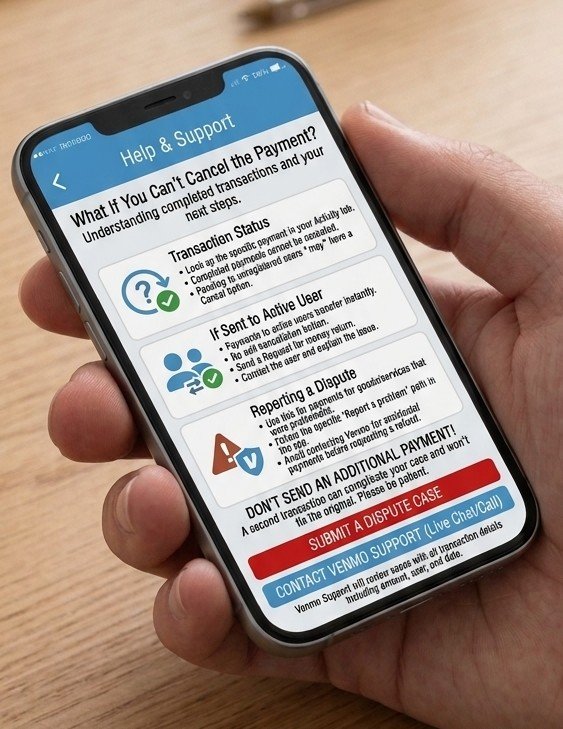
If you don’t see a Cancel option, Venmo may have already completed the payment, or the transaction may not qualify for cancellation. This happens most often when you send money to an active Venmo user because Venmo generally transfers those payments instantly.
First, Check the Payment Status
Open your Venmo Activity and select the transaction. Look at its current status and check whether Venmo provides any available action.
If you sent the payment to an unregistered email address or phone number and it is still pending, you may see a Cancel option.Payments sent to an active user, however, generally do not have a cancellation button.
If You Sent Money to the Wrong Active User
Don’t keep looking for a hidden Cancel button. Instead, try to recover the money through the available options:
- Send the recipient a Request for the amount you sent by mistake.
- Add a short explanation so they understand why you are requesting the money.
- If they don’t return it, contact Venmo Support for assistance.
Keep Your Payment Details
Before contacting support, save the important information about the transaction. This can include the recipient’s username, payment amount, date, and payment note.
Having these details ready can make it easier to explain the situation and help support identify the correct transaction.
Avoid Sending Another Payment
If you are waiting for a response or support assistance, don’t send another payment to try to fix the original transaction. Doing so could create an additional payment and make the situation more difficult to resolve.
The key point is simple: if Venmo does not show a Cancel option, you generally cannot cancel the payment yourself. Your next step depends on whether the payment went to an active user, an unregistered account, or involves another issue that requires support.
Frequently Asked Questions About Canceling a Venmo Payment
Can you cancel a Venmo payment after sending it?
Usually, no. If you send a payment to an active Venmo user, Venmo generally transfers it instantly, so you cannot cancel it directly. If you send the payment to an unregistered email address or phone number, Venmo may show a Cancel option while the payment remains pending.
Can I cancel a Venmo payment to the wrong person?
Not if the recipient is an active Venmo user. You can send the person a Request asking them to return the money. If they do not return it, contact Venmo Support for assistance.
Can you cancel a pending Venmo payment?
Only when Venmo provides a Cancel option. This can happen when the payment was sent to someone who does not have a registered Venmo account. Check the transaction under Activity to see whether the option is available.
What happens if I send money to an inactive Venmo account?
The payment may remain pending. If the recipient does not have a Venmo account linked to their email address or phone number, you may see a Cancel button in the Activity section. You can use it to cancel the eligible payment.
Can someone cancel a Venmo payment sent to me?
A recipient generally cannot cancel a completed payment themselves. If the sender says they made a mistake, verify the payment in your own Venmo account before returning any money.
Can I get my money back from a Venmo payment?
Possibly, depending on the situation. For an accidental payment to an active user, you can request the money back from the recipient or contact Venmo Support. You cannot simply cancel a completed payment like an eligible pending payment.
Should I send another payment if I made a mistake?
No. First check the original transaction and use the appropriate recovery option. Sending another payment could make the situation more complicated.
Conclusion
You cannot directly cancel a completed Venmo payment sent to an active user. Venmo generally transfers these payments instantly, so you won’t see a Cancel button once the transaction goes through.
If you sent money to an unregistered email address or phone number, the payment may remain pending, and Venmo may show a Cancel option in your Activity. That is the main situation where you can cancel a payment yourself.
If you accidentally paid the wrong active user, send them a Request asking them to return the money. If they do not help, contact Venmo Support and provide the transaction details.
Before sending any Venmo payment, always double-check the recipient and amount. A few seconds of checking can help you avoid a payment that may be difficult to reverse later.