

Introduction
Why AMC’s Policy Feels Confusing at First
Many people assume movie tickets become non-refundable as soon as they purchase them. AMC’s policy can be more flexible, but the timing of your request matters. In most situations, you need to complete the cancellation before the scheduled showtime.
Another reason the policy feels confusing is that AMC sells tickets through several channels. You might purchase directly from the AMC website, use the AMC app, buy a ticket at the theatre, or reserve a seat through an AMC Stubs membership. Those situations can involve different cancellation steps.
Your payment method can affect the refund experience as well. A refund to an AMC gift card may appear differently from a refund sent back to a credit or debit card. Online and app purchases may also include convenience fees that do not return with the ticket price.
What This Guide Covers
This guide explains the AMC ticket refund process in practical terms. You will learn how to cancel an eligible ticket through the AMC website, use the app, contact AMC by phone, and handle tickets purchased directly at the box office.
You will also learn what can happen to convenience fees, food and beverage purchases, AMC Stubs reservations, and special-event tickets. Later sections explain refund timing and what you can do if the cancellation option does not appear.
If you regularly book travel or entertainment and want to understand how cancellation deadlines work, you may also find our guide on How to Cancel a Flight & Get a Refund: 24-Hour Rule useful. The rules differ between movie tickets and flights, but both show why checking the cancellation deadline matters.
The One Rule That Matters Most
For most standard AMC purchases, the key rule is simple: request your refund before the movie starts. Once the showtime passes, a standard refund usually becomes unavailable.
If you already know that you cannot attend, cancel immediately instead of waiting until the last few minutes. Extra time gives you a chance to retry the website or app if something goes wrong.
Keep your confirmation email as well. It can show the movie, theatre, showtime, order number, and payment information that AMC may need if you have to contact support.
AMC Ticket Refund Policy Explained
AMC generally allows eligible tickets purchased online, through the app, or at a theatre box office to receive a refund when you cancel before the scheduled showtime. However, the exact terms can vary according to the ticket type and purchase method.
Standard movie tickets usually follow the normal cancellation process. Special events, promotional tickets, membership reservations, and third-party purchases may follow different conditions.
If you are unsure whether your ticket qualifies, check the original confirmation email first. Look for any refund restrictions or special terms attached to the purchase.
For the most current information, you can also check the official AMC Theatres FAQs before cancelling.
The 30-Minute Guideline
You may see references to a 30-minute cancellation window when researching an AMC ticket refund. However, AMC’s policy information focuses on cancelling before the scheduled showtime. Because online systems and individual ticket conditions can vary, it is safer to cancel well before the movie begins.
A 30-minute buffer can give you useful breathing room. If the website refuses to load or the app does not display your ticket, you still have time to try another method.
There is little reason to wait if you already know that you cannot attend. Cancelling several hours early gives you more time to confirm the request and save the cancellation email.
What Gets Refunded and What Doesn’t
When an eligible cancellation goes through, AMC refunds the ticket amount according to the applicable refund terms. Online and app purchases can also include convenience fees, and those fees may not return with the ticket price.
Because of that, the amount you receive may differ from the total shown on your original receipt. Always review the refund amount before confirming the cancellation.
If your order contains several tickets, pay attention to which tickets you are cancelling. You do not want to cancel an entire group order when only one person can no longer attend.
Food and Beverage Orders
If you pre-ordered food or drinks with your movie reservation, check the order details before assuming that cancelling the ticket automatically cancels every item. Food and beverage purchases can have their own conditions.
Review your AMC account and confirmation email to see whether the food order connects to the ticket cancellation. If the refund does not appear as expected, contact AMC with the original order information.
Keeping the confirmation email is especially useful when a ticket and food purchase appear under the same transaction. It gives customer service the details needed to identify what you purchased.
Gift Ticket Purchases
Gift ticket purchases can follow different rules depending on how the gift works and whether someone has already redeemed it. If you received a ticket as a gift, check the ticket information before attempting an AMC ticket refund.
The original purchaser may also need to handle the cancellation if the transaction remains connected to their account or payment method.
Keep the gift confirmation, ticket information, and any redemption details available. Those details can help AMC determine which cancellation options apply.
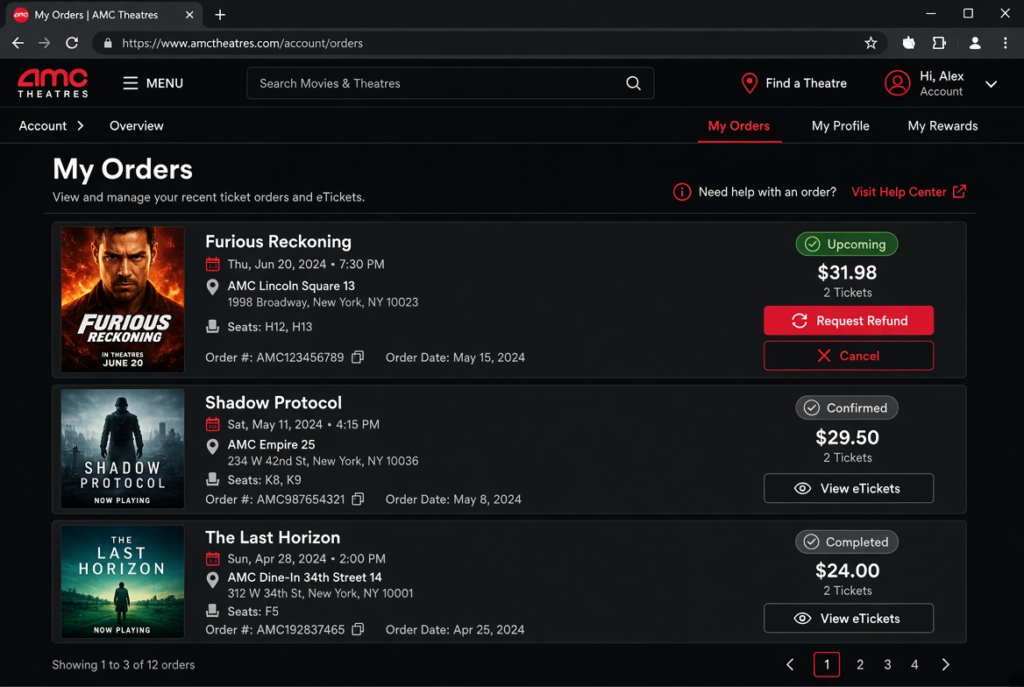
How to Cancel AMC Ticket Online
The AMC website is usually the most convenient option when you have access to a computer. Before starting, make sure you can access the account or email address connected to the purchase.
If you bought the ticket while signed in to your AMC account, the order should normally appear in your account information.
Step-by-Step: Cancelling Through Your AMC Account
Step 1: Log in. Go to AMC Theatres and sign in to the account you used to purchase the ticket.
Step 2: Find your order. Open your account area and look for your tickets or orders. Find the upcoming movie you want to cancel.
Step 3: Select the ticket. Open the order details and check the movie title, theatre, date, and showtime before continuing.
Step 4: Request the refund. Look for the available cancellation or refund option on the order page. Select it if the ticket qualifies.
Step 5: Review the refund. Check the amount that AMC expects to return and review any amount that will not qualify for a refund.
Step 6: Confirm the cancellation. Complete the confirmation step to submit the cancellation request.
Step 7: Save the confirmation. Check your email for confirmation and keep it until the refund reaches your original payment method.
After submitting the request, return to your order history if possible. Make sure the ticket no longer appears as an active upcoming reservation.
Why Some Orders Look Different on the Website
Not every order will look identical. A group booking or an order containing several tickets may show multiple reservations under one transaction.
The ticket type can also affect the options available on the page. A standard movie ticket may provide a simple cancellation option, while a special event may display different terms.
Before confirming anything, read the cancellation screen carefully. If only one person in your group cannot attend, make sure the website is not cancelling the entire order.
If You Can’t Find the Cancel Button
A missing cancellation option does not always mean you have lost the opportunity for an AMC ticket refund. First, check the ticket type and the account you are using.
Special events, promotional tickets, and certain other purchases can have different refund conditions. A ticket purchased with another email address may also appear under a different account.
Check your original confirmation email for restrictions. If the ticket appears eligible but the cancellation option still does not appear, contact AMC support as soon as possible.
Double-Checking the Cancellation Went Through
After confirming the cancellation, check your email for a confirmation message. You can also refresh your order history and verify that the ticket no longer shows as an active reservation.
Keep the confirmation until the money reaches your original payment method. If a problem occurs later, that record can show when you submitted the cancellation.
If the refund takes longer than expected, provide the confirmation information to AMC support. It can help the representative locate the transaction.
How to Cancel AMC Ticket on the App
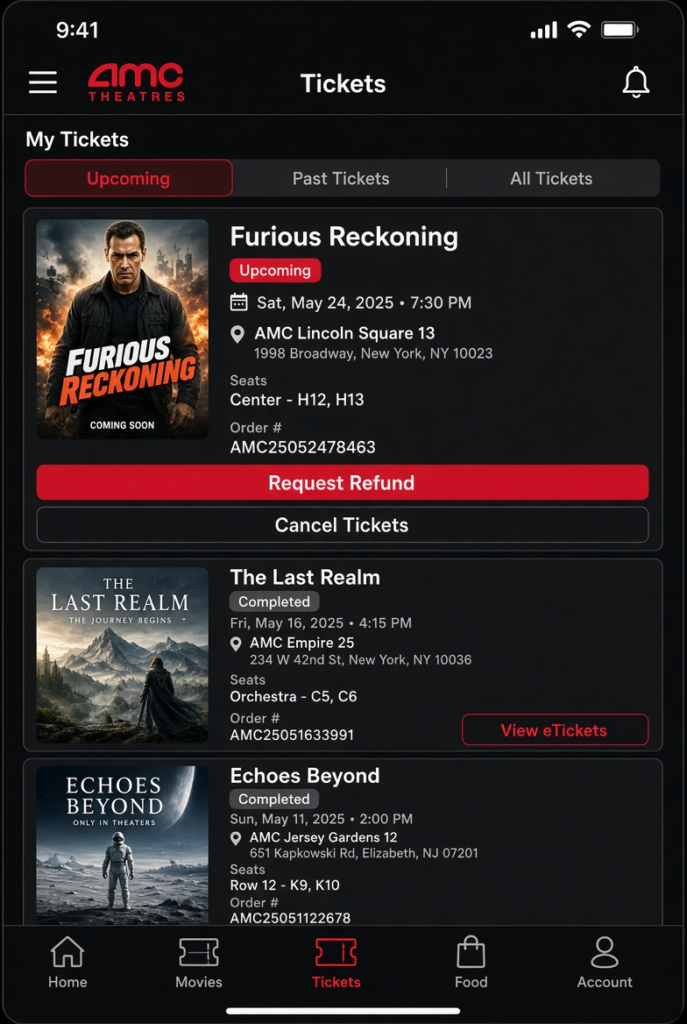
The AMC app gives you another way to manage an eligible ticket when you are away from your computer. This can be particularly useful when your plans change shortly before a movie.
Before starting, sign in to the account connected to your ticket and make sure you have a reliable internet connection.
Opening Your Tickets in the App
Open the AMC Theatres app and sign in if necessary. Go to the section containing your tickets or orders and find the upcoming movie.
Open the reservation and check the theatre, date, and showtime. Confirm those details before selecting a cancellation option.
Cancelling From the App
Open the ticket details and look for the available cancellation or refund option. Select it and follow the prompts shown by the app.
Review the refund information before confirming. Pay attention to the amount that will return to your payment method and any charges that will not qualify for a refund.
After completing the request, check for an in-app confirmation or an email from AMC. Save that confirmation until the refund arrives.
Why the App Sometimes Works Better in a Pinch
The app can save time when you discover that you cannot attend while you are away from a computer. You can manage the reservation from your phone instead of finding a computer or waiting at the theatre.
It can also help when you are already travelling to another location. As long as the ticket remains eligible and the app works properly, you can submit the cancellation from wherever you are.
Remember that deleting the AMC app does not cancel a ticket. You need to use the ticket or order controls to submit the cancellation.
App-Specific Glitches to Watch For
An outdated app version can sometimes cause display or login problems. If your ticket does not appear correctly, check whether an app update is available.
Signing out and signing back in may also resolve an account display problem. If the app continues to cause trouble, switch to the AMC website rather than waiting until the cancellation deadline approaches.
When showtime is close, speed matters. Use whichever official AMC channel gives you the clearest way to submit the request.
AMC Ticket Refund Phone Number
Calling AMC can make sense when the website or app does not give you the cancellation option you expect. It can also help with unusual orders that need individual attention.
Use AMC’s official customer service information rather than relying on phone numbers posted on old blogs or random websites.
Finding the Right Number
AMC publishes customer service information through its official website. Because contact details can change, check the official AMC Theatres FAQs or AMC’s official support pages for the current contact option.
Avoid using an unverified number from a forum, social media post, or outdated article. Going directly through AMC’s official website gives you a safer starting point.
What to Have Ready Before You Call
Have the following information available:
- Your order confirmation number
- The email address used for the purchase
- The movie title
- The theatre location
- The scheduled showtime
- Your AMC Stubs account details, if applicable
- The last four digits of the payment card, if AMC requests verification
Having these details ready can make the call easier. The representative may need to verify the purchase before discussing an AMC ticket refund.
If the showtime is approaching, tell the representative that clearly. The timing may affect what options remain available.
Being Clear About What You Need
Explain that you want to cancel the ticket and request a refund. If you want to cancel only one ticket from a larger order, say that before the representative processes the request.
Ask the representative to confirm the expected refund amount and where AMC will send it. You can also ask how long the refund may take to appear.
Before ending the call, request a confirmation number or written confirmation when available. Keep that information until the transaction is complete.
What to Do If the Line Is Busy
AMC can receive more customer requests during major movie releases and busy weekends. If the phone line has a long wait and showtime is approaching, check whether you can complete the cancellation through the website or app instead.
Do not wait until after showtime if you already know you cannot attend. An online cancellation can take less time than waiting for a representative.
Can You Cancel an AMC Ticket and Get a Refund?
Yes, eligible AMC tickets can generally receive a refund when you cancel before the scheduled showtime. However, the exact result depends on the ticket type, purchase method, and conditions attached to the order.
Checking those details before you cancel can prevent surprises.
Standard Tickets
Standard movie tickets purchased directly from AMC generally follow the normal cancellation process when you request the refund before showtime.
If your plans change, open the order and look for the available cancellation option. The system should show whether your particular ticket qualifies.
Cancelling early also gives you time to contact AMC if the normal process does not work.
Special Events and Fan Screenings
Special screenings, fan events, and exclusive releases can have different cancellation conditions. Always check the terms attached to the ticket before assuming that the standard policy applies.
Limited-seat events may carry restrictions that regular movie tickets do not. Your confirmation email should provide useful information about the purchase.
If the ticket terms state that the purchase is non-refundable, the normal cancellation process may not provide an AMC ticket refund.
AMC Stubs A-List and Premiere Memberships
Membership reservations can work differently from regular paid tickets. If you used an AMC A-List membership to reserve a movie, cancelling the reservation before showtime generally affects the reservation or membership benefit rather than creating a normal cash refund.
The important step is to cancel the reservation before the showtime when the reservation remains eligible for cancellation.
Check your AMC account after cancelling to make sure the reservation status has updated correctly.
Group and Corporate Bookings
Large group bookings, private theatre rentals, and corporate events may follow separate booking procedures. These reservations can involve different cancellation deadlines or refund terms.
If you booked through an AMC events representative or another dedicated contact, start with that same channel. The standard individual-ticket process may not cover your booking.
Keep the original booking information nearby so the representative can identify the reservation quickly.
What Happens After You Cancel an AMC Ticket?
Once you submit an eligible cancellation, several things can happen. The reservation changes first, while the actual refund may take additional time to reach your payment account.
Do not worry if the ticket shows as cancelled before the money appears in your bank statement. Those two steps do not always happen at the same moment.
Your Seat Becomes Available Again
Cancelling a ticket can release your seat back into AMC’s ticketing system. Another customer may then have the opportunity to purchase that seat if the showtime still has availability.
For that reason, cancelling before showtime matters. Once you cancel, you should not expect the same seat to remain reserved for you.
If you change your mind later, you may need to purchase another ticket.
Your Refund Gets Processed
After the cancellation succeeds, AMC begins the refund process according to the payment method and applicable terms.
The cancellation itself may appear immediately, while your bank or payment provider needs additional time to post the refund.
Keep your confirmation until you see the refund. That record can help if you need to contact AMC or your payment provider later.
Your Confirmation Email Updates
Check your inbox after submitting the cancellation. AMC may send a confirmation showing that the order or ticket has been cancelled.
Save the message until the refund appears. It can provide useful details such as the order number and cancellation date.
If the confirmation does not arrive, check your spam or junk folder before contacting support.
Your AMC Stubs Points, If Applicable
If your purchase earned AMC Stubs points, a cancellation can affect the points associated with that transaction. Check your account after the refund to see whether the points balance has changed.
The timing of the adjustment can vary, so give the account some time to update before assuming something went wrong.
How Long Does an AMC Ticket Refund Take?
The time required for an AMC ticket refund depends largely on the original payment method.
The cancellation can happen quickly, but the refund may need additional processing before it appears in your balance or statement.
Gift Card Purchases
Refunds connected to an AMC gift card can return to the gift card balance rather than appearing as a separate bank transaction.
If you do not see a separate refund notification, check the gift card balance associated with the purchase.
Keep your cancellation confirmation in case the balance does not update as expected.
Credit or Debit Card Purchases
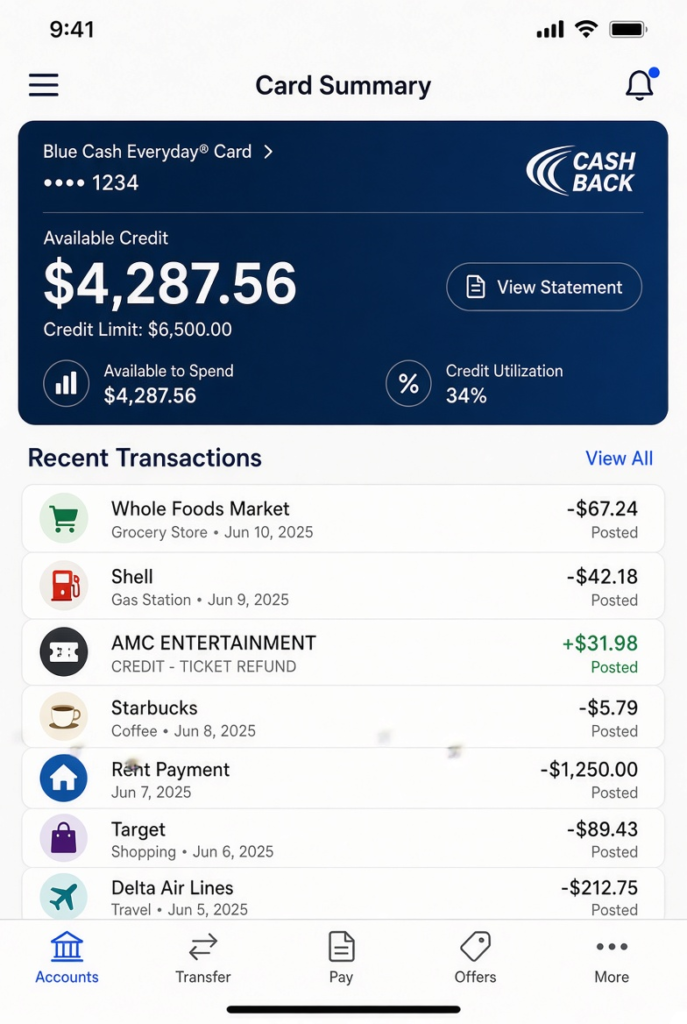
A card refund can take several business days to appear on your statement. Your bank or card issuer controls part of that timeline, so AMC may complete its side before the transaction appears in your account.
If you cancelled recently, give the payment provider reasonable processing time before assuming the refund failed.
You should also check your transaction history instead of looking only for a new deposit. Some banks display refunds differently from regular incoming payments.
Digital Wallets
If you paid through a digital wallet such as Apple Pay or PayPal, the refund generally follows the payment route connected to the original transaction.
Check both the wallet activity and the underlying card or account if you cannot immediately locate the money.
The display can differ depending on the payment provider, so the refund may not look exactly like the original purchase.
What to Do If the Refund Is Taking Too Long
Start by checking your cancellation confirmation. Make sure the ticket actually shows as cancelled and that the refund request went through.
If the expected processing period has passed, contact AMC with your order number and cancellation details. Ask whether AMC has completed the refund on its side.
If AMC confirms that it already issued the refund, contact your bank, card issuer, or payment provider. Give them the refund date and transaction information that AMC provides.
If a refund remains unresolved and you believe a payment dispute may be necessary, our guide on How the Chargeback Process Works: A Step-by-Step Guide explains how the process generally works. A chargeback should not be your first step when AMC is still processing a valid refund, but it can be useful to understand your options if a legitimate billing problem remains unresolved.
What If You Bought AMC Tickets at the Box Office?
Box office purchases can require a different approach from online orders. Because you bought the ticket in person, the website or app may not provide the same cancellation controls.
The theatre that handled the purchase is usually the most practical place to start.
No Online Cancellation Option
A ticket purchased directly at the box office may not appear as an online order in your AMC account. That means you may not see a normal cancellation button.
Instead, keep your physical ticket or receipt and ask the theatre staff about the available refund options.
Visiting the Theatre Before Showtime
If you need to cancel a box office ticket, return to the theatre before the scheduled showtime when possible. Bring your ticket or receipt so staff can identify the transaction.
Give yourself enough time for the theatre employee to locate the purchase and explain the available options.
Cash Refunds Work Differently
If you originally paid with cash, the refund process can differ from a card purchase because there is no card transaction to reverse.
Keep the original receipt as proof of purchase. It can make the transaction easier for staff to verify.
If you paid with a card, the refund may instead return through the original payment method.
What If You Can’t Get Back to the Theatre in Time
If you cannot return to the theatre before showtime, contact the theatre or AMC as quickly as possible and explain the situation.
Your options may become more limited once the scheduled showtime passes. Acting before the deadline gives you the best chance of resolving the issue.
What If You Can’t Cancel Your AMC Ticket?
Sometimes the cancellation option does not appear, or the showtime has already passed. Before assuming that the ticket has no refund option, identify the reason for the problem.
The ticket type and purchase source can make a significant difference.
Check the Ticket Type First
Look at your original confirmation and check whether the ticket was a special event, promotional offer, membership reservation, or another type with separate conditions.
Also confirm who processed the purchase. If another company sold the ticket, AMC may not control the refund.
These details can explain why the normal cancellation option does not appear.
Contact Support Directly
If your standard ticket should qualify but the website or app will not let you cancel, contact AMC support before showtime if possible.
Provide the order number, movie title, theatre, showtime, and email address connected to the purchase. Explain exactly what happens when you try to cancel.
If the online option fails, ask whether a representative can help with the cancellation.
If the Showtime Already Passed
Once the scheduled showtime has passed, a standard AMC ticket refund generally becomes unavailable. However, a theatre-related problem can create a different situation.
For example, if the theatre closed the screening or a significant technical problem prevented customers from watching the movie, contact AMC and explain what happened.
A simple change of plans is different from a service problem caused by the theatre. Give AMC the specific details so the company can determine whether any exception applies.
Documenting a Bad Theatre Experience
If your issue involves a genuine problem during the screening, write down what happened while the details are fresh. Note the approximate time, theatre location, movie, showtime, and any staff members you spoke with.
Keep receipts, confirmation emails, screenshots, or other relevant records as well.
Clear documentation can make it easier for AMC support to understand the situation and determine whether another resolution is appropriate.
Frequently Asked Questions About AMC Ticket Refunds
Can I Cancel an AMC Ticket Online?
Yes, eligible tickets can generally be cancelled through the AMC website before the scheduled showtime. Sign in, locate the order, and follow the available cancellation or refund instructions.
If the option does not appear, check the ticket conditions and purchase source before contacting AMC.
How Do I Contact AMC for a Refund?
Start with AMC’s official website or help resources for the current customer service options. You can also use the website or app when the ticket qualifies for online cancellation.
Have your order confirmation and purchase details ready if you need assistance.
Does AMC Refund Convenience Fees?
Convenience fees connected to online or app purchases may not return with the ticket refund. The amount you receive can therefore differ from the total amount on your original receipt.
Always review the refund summary before confirming the cancellation.
Can I Cancel After the Movie Has Started?
A standard AMC ticket generally does not qualify for a normal refund after the scheduled showtime. If the theatre itself caused a significant service problem, however, contact AMC and explain the circumstances.
AMC may handle a theatre-related issue differently from a simple missed movie.
Can I Get a Refund If I Bought Through a Third-Party Site?
If you purchased through a third-party ticket seller, start with the company that processed your payment. AMC may not have control over the third party’s refund process.
Check the original confirmation email to identify the seller and its cancellation terms.
Conclusion
Getting an AMC ticket refund usually comes down to timing. If your ticket qualifies, cancelling before the scheduled showtime gives you the best chance of receiving your money back. The website and app provide convenient options for many purchases, while box office and special-event tickets may require a different approach.
Before you cancel, check the ticket type, review the refund amount, and make sure you are using the account or purchase method connected to the original order. Once the cancellation succeeds, keep the confirmation until the refund reaches your payment method.
If the normal cancellation option does not appear, do not immediately assume that your money is gone. Check the purchase conditions, confirm whether AMC or a third party processed the transaction, and contact the appropriate support channel while you still have time.