

introduction
If you use D-ID to create AI avatar videos but no longer need a paid plan, you can cancel in a couple of minutes from your account’s Billing page. When you cancel, your plan stays active until the end of the billing period you already paid for, and then your account is downgraded. This guide shows you exactly how to cancel, what happens to your videos and data afterwards, how to ask for a refund, and how to delete your account completely.
Quick Answer: How to Cancel D-ID
| Question | Answer |
|---|---|
| Where do I cancel? | D-ID Studio > Billing > Cancel plan |
| Do I lose access right away? | No. Your plan stays active until the current billing period ends |
| Is the account deleted when I cancel? | No. Cancelling only stops future payments |
| How do I delete my account? | Email support@d-id.com |
| Subscribed through Apple or Google Play? | Cancel in your Apple ID or Google Play subscription settings |
Before You Cancel: 4 Things to Know
- Check your billing cycle. D-ID offers monthly and annual billing. Annual plans are charged upfront for the whole year, so cancel before the renewal date, not after.
- Cancelling is not deleting. Cancelling stops future charges. Your account and videos remain until you ask D-ID to delete the account.
- Logging out or uninstalling does nothing. Billing continues until you cancel the plan itself.
- Watch the first-month offer. Lite, Pro and Advanced plans advertise unlimited videos for the first month. If you signed up for that offer and want to stop, cancel before your first renewal.
Method 1: Cancel D-ID on the Website
Use this if you subscribed on d-id.com with a card.
- Log in to your D-ID Studio account with the email you used to subscribe.
- Open the Billing section of your account.
- Click Cancel plan.
- Follow the on-screen prompts and confirm.
- Save the confirmation email or take a screenshot until your next billing date has passed.
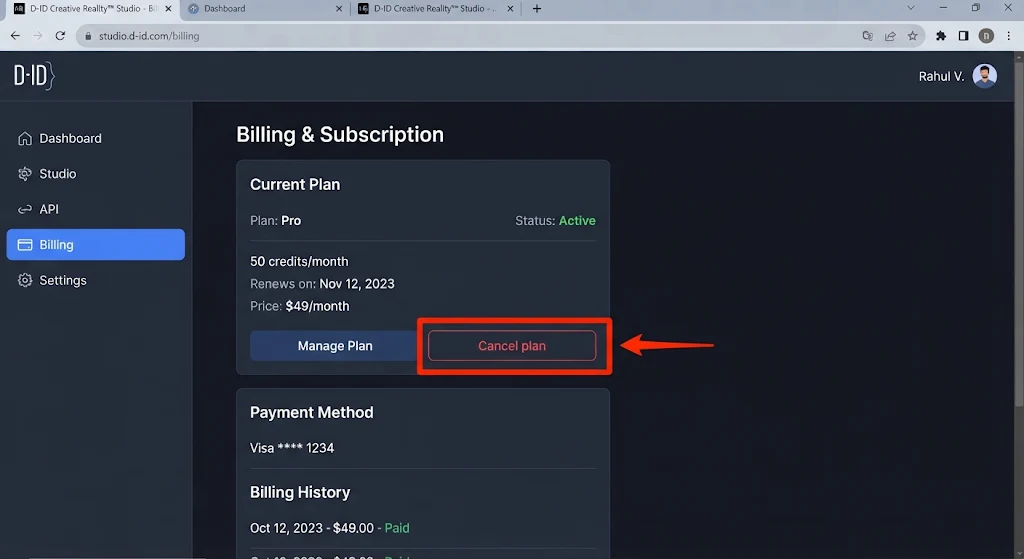
If you don’t see a Cancel plan button, check that you are logged in with the right email, since people often have more than one account. Also check where you subscribed (see the next section).
Method 2: Cancel If You Subscribed Through Apple or Google Play
D-ID has a mobile app. If your D-ID charge comes from Apple or Google instead of D-ID directly, you must cancel through them, because D-ID can’t cancel a store subscription from its website.
On iPhone or iPad:
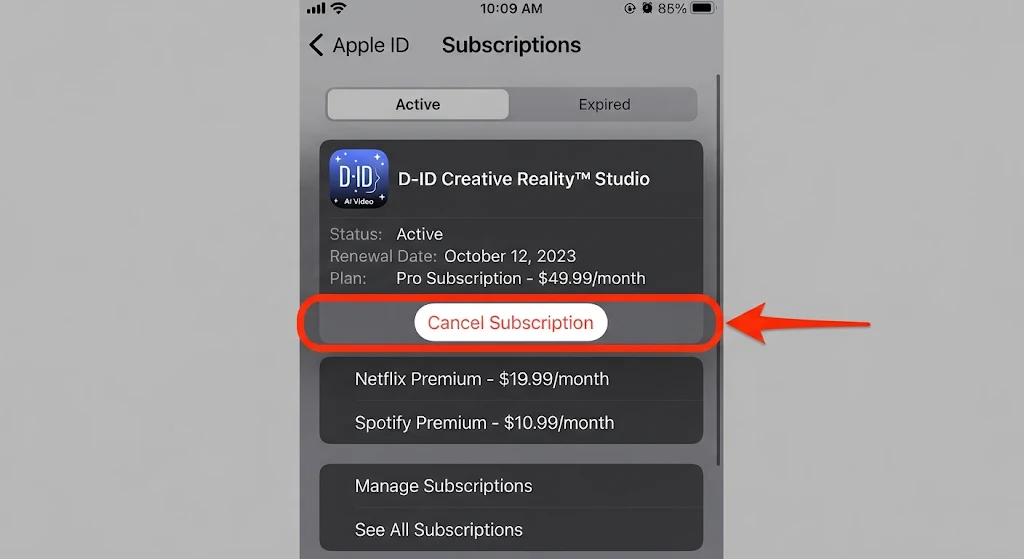
- Open Settings and tap your name.
- Tap Subscriptions.
- Select D-ID.
- Tap Cancel Subscription and confirm.
On Android:
- Open the Google Play Store app.
- Tap your profile icon.
- Go to Payments & subscriptions > Subscriptions.
- Select D-ID and tap Cancel subscription.
If D-ID doesn’t appear in either list, you were billed directly by D-ID, so use Method 1.
What Happens After You Cancel
- You keep your plan until the period ends. Your plan remains active until the end of the current billing period. Afterwards, your account is downgraded.
- Your minutes and features change. D-ID plans are based on monthly minutes (Lite 10, Pro 15, Advanced 100 minutes per month). After the downgrade, you get the limits of the lower plan, including the full-screen watermark on the Trial plan and the D-ID watermark on Lite.
- Your data stays until you delete the account. Cancelling does not remove your videos or avatars. Only account deletion does.
Common Problems and How to Fix Them
I can’t find the Cancel plan button.
Make sure you are logged in with the email that holds the subscription. If you subscribed through Apple or Google, cancel there instead.
I was charged after the first-month offer ended.
The first-month unlimited offer on Lite, Pro and Advanced converts into a normal paid plan at renewal. If you were charged and didn’t mean to be, email support@d-id.com straight away with your account email and invoice.
I’m on an annual plan and want to stop.
Cancel in Billing so it doesn’t renew. Annual plans are billed upfront, so check your renewal date and cancel well before it.
I want to switch between monthly and annual billing.
Contact support@d-id.com. They handle the switch for you.
I’m on an Enterprise plan.
Enterprise plans are custom, so contact your Customer Success Manager or support@d-id.com for cancellation and contract terms.
How to Request a Refund From D-ID
If you were charged by mistake, email support@d-id.com from your registered email and include:
- Your account email
- The invoice or payment date
- A short explanation of why you are requesting the refund
Send the request as soon as you notice the charge, since a quick request looks better than a late one. Refunds are decided by D-ID and are not guaranteed, so read the refund section of D-ID’s Terms of Use for the exact conditions. If you paid through Apple or Google Play, request the refund from Apple or Google instead.
How to Delete Your D-ID Account
D-ID doesn’t have a delete button in its settings. To delete your account:
- Cancel your plan first so you aren’t billed again.
- Send an email from your registered address to support@d-id.com asking to delete your account.
- Wait for D-ID’s confirmation.
Deleting your account removes your access to D-ID along with all your generated or translated videos, Agents and stored data. Download anything you want to keep first. If you are on the free plan and stop using D-ID, your data is deleted after 6 months of inactivity, and D-ID emails you before this happens.
D-ID Plans and Prices (for Reference)
| Plan | Price | Monthly minutes |
|---|---|---|
| Trial | $0, 14 days | 3 minutes |
| Lite | $4.7/month on annual billing | 10 |
| Pro | $16/month on annual billing | 15 |
| Advanced | $108/month on annual billing | 100 |
| Enterprise | Custom | Custom |
Prices change, so always confirm on D-ID’s pricing page before you decide.
Frequently Asked Questions
No, as long as you cancel before your renewal date. Your plan runs until the end of the period you already paid for.
No. Cancelling only downgrades your account. Your videos are removed only if you delete your account.
Not automatically. Contact support@d-id.com and explain your situation, but refunds are decided by D-ID.
Email support@d-id.com. There is no self-service delete button.
Email support@d-id.com.
Conclusion
To cancel D-ID, open Billing in D-ID Studio and click Cancel plan, or cancel through Apple or Google Play if that’s where you were billed. Do it before your renewal date, keep your confirmation, and email support only if you also want a refund or want your account deleted. For more ways to stop recurring charges, read our guide on [how to cancel unwanted subscriptions] and our tutorial on [how to cancel your Character.AI subscription].