

Introduction
Need to cancel an Airbnb reservation because your plans changed? You can usually cancel a booking through your Airbnb account, but the amount you receive back depends on the reservation’s cancellation terms and the timing of your cancellation.
Before you cancel, check the reservation details carefully. Airbnb shows the applicable cancellation information for your booking, including whether you qualify for a full or partial refund.
In this guide, you’ll learn how to cancel an Airbnb reservation, when you can cancel without a penalty, what happens after cancellation, and what you can do if you have trouble canceling your booking.
How to Cancel an Airbnb Reservation
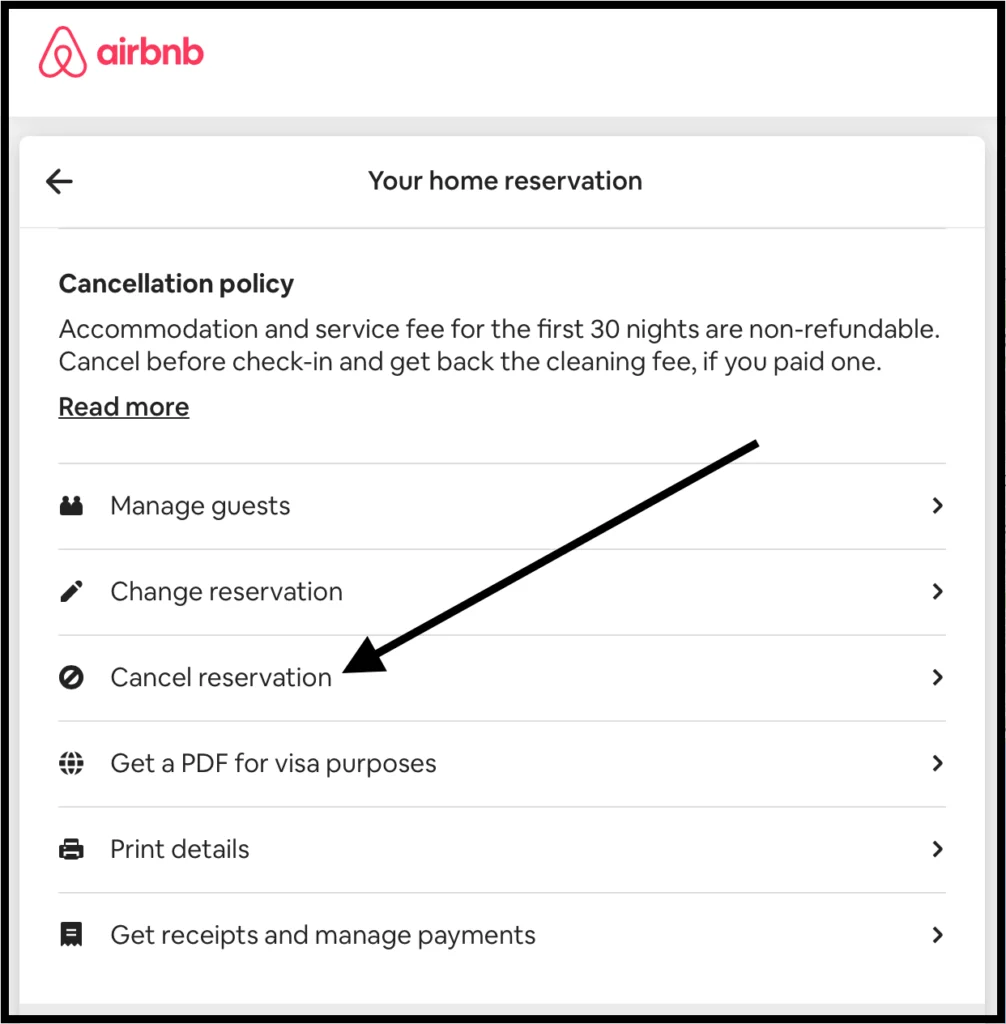
If you need to cancel an Airbnb reservation, you can usually do it from your Airbnb account. The refund you receive depends on the cancellation terms that apply to your booking.
Steps to Cancel Your Airbnb Reservation
- Sign in to your Airbnb account.
- Open Trips from the Airbnb menu.
- Select the reservation you want to cancel.
- Open the booking details and choose Cancel reservation.
- Review the cancellation information, including any refund amount or cancellation fee.
- Confirm the cancellation.
Before you confirm, carefully review the refund amount shown by Airbnb. The amount can vary based on the reservation’s cancellation policy, the timing of your cancellation, and the specific booking terms.
Check the Cancellation Policy First
Open your reservation details and review the cancellation policy before you cancel. This can help you understand how much money Airbnb may return to you.
Some reservations have different cancellation terms, so don’t assume that every booking offers the same refund. Checking the policy first can help you avoid an unexpected loss.
Keep Your Cancellation Confirmation
After canceling, save the confirmation from Airbnb. You can also keep the cancellation email or notification for your records.
This information can help if you need to contact Airbnb later about the cancellation or refund.
Can You Cancel an Airbnb Reservation Before Check-In?
Yes, you can generally cancel an Airbnb reservation before check-in, but the refund depends on the cancellation policy attached to your booking. Airbnb displays the applicable terms when you review the reservation.
Check Your Cancellation Terms
Open your reservation and review the cancellation policy before you confirm anything. The policy tells you whether you qualify for a full refund, partial refund, or no refund.
The timing of your cancellation can also affect the amount you receive. Canceling earlier may give you better refund options than waiting until the check-in date gets closer.
What If Your Plans Change Before Check-In?
You can cancel the reservation through your Airbnb account if you no longer need the accommodation. Open Trips, select the reservation, and review the cancellation options shown for that booking.
If Airbnb shows a refund amount before confirmation, check it carefully. This gives you a clear idea of what you will receive before you complete the cancellation.
Special Circumstances
Some situations may qualify for different cancellation or refund options under Airbnb’s applicable policies. If an unexpected event affects your trip, review the information Airbnb provides for your specific reservation.
If you believe your situation qualifies for special consideration but the normal cancellation option does not provide the expected result, contact Airbnb Support and explain the circumstances.
Canceling Before Check-In Does Not Guarantee a Full Refund
Simply canceling before the check-in date does not automatically guarantee a full refund. The reservation’s cancellation terms still determine how much Airbnb returns.
For this reason, always review the refund information shown during the cancellation process before confirming your decision.
How to Cancel an Airbnb Reservation Without a Penalty
If you want to cancel an Airbnb reservation without a penalty, first check the cancellation policy for your specific booking. Airbnb determines the refund based on the terms attached to that reservation, so every booking may have different conditions.
Check the Cancellation Policy Before You Cancel
Open your reservation through Trips and review the cancellation details. Airbnb should show the refund information before you confirm the cancellation.
If the policy allows a full refund within a certain period, canceling during that period can help you avoid losing money.
Cancel Within the Allowed Time
Timing matters when you want to cancel without a penalty. A reservation may offer better refund terms when you cancel earlier, while waiting until closer to check-in can reduce the amount you receive.
Check the exact deadline shown for your booking rather than relying on a general cancellation timeframe.
Look for the Refund Amount Before Confirming
During the cancellation process, Airbnb can show the amount you can receive based on your reservation’s terms. Review this amount carefully before selecting the final confirmation option.
If the displayed refund does not match what you expected, stop and review the cancellation policy again before completing the process.
Contact Airbnb for Unusual Situations
Sometimes unexpected circumstances can affect your ability to travel. If you believe your situation qualifies for special consideration, contact Airbnb Support and explain what happened.
Keep relevant booking details and supporting information available when you contact support. Airbnb can then review your situation under the policies that apply to your reservation.How to Cancel an Airbnb Reservation Without a Penalty
If you want to cancel an Airbnb reservation without a penalty, first check the cancellation policy for your specific booking. Airbnb determines the refund based on the terms attached to that reservation, so every booking may have different conditions.
Check the Cancellation Policy Before You Cancel
Open your reservation through Trips and review the cancellation details. Airbnb should show the refund information before you confirm the cancellation.
If the policy allows a full refund within a certain period, canceling during that period can help you avoid losing money.
Cancel Within the Allowed Time
Timing matters when you want to cancel without a penalty. A reservation may offer better refund terms when you cancel earlier, while waiting until closer to check-in can reduce the amount you receive.
Check the exact deadline shown for your booking rather than relying on a general cancellation timeframe.
Look for the Refund Amount Before Confirming
During the cancellation process, Airbnb can show the amount you can receive based on your reservation’s terms. Review this amount carefully before selecting the final confirmation option.
If the displayed refund does not match what you expected, stop and review the cancellation policy again before completing the process.
Contact Airbnb for Unusual Situations
Sometimes unexpected circumstances can affect your ability to travel. If you believe your situation qualifies for special consideration, contact Airbnb Support and explain what happened.
Keep relevant booking details and supporting information available when you contact support. Airbnb can then review your situation under the policies that apply to your reservation.
How to Cancel an Airbnb Reservation as a Guest
If you booked an Airbnb stay as a guest and your plans have changed, you can cancel the reservation from your Airbnb account. The refund depends on the cancellation policy attached to your booking and the timing of your cancellation.
Find Your Reservation
Open Airbnb and go to Trips. Select the reservation you want to cancel and open its booking details.
Before you continue, review the cancellation terms shown for that reservation. Airbnb can apply different policies to different bookings, so checking the details first can help you understand the possible refund.
Start the Cancellation
From your reservation details, select the option to cancel the booking. Airbnb should show the cancellation consequences before you confirm.
Review the amount displayed for your refund and check any applicable cancellation terms. If everything looks correct, confirm the cancellation.
What If You Have a Problem With the Cancellation?
If the cancellation option does not appear or the refund information looks different from what you expected, review Airbnb’s official cancellation and refund information before proceeding.
You can also contact Airbnb Support if you need help with a specific reservation.
Keep Your Booking Information
After you cancel, save the confirmation and refund details. Keeping these records can help if you need to ask Airbnb about the cancellation later.
Internal link opportunity: Add your existing article “How to Cancel a Vacation Package and Get a Refund” here because both articles cover travel booking cancellations and refunds.
How to Cancel an Airbnb Reservation as a Host
If you are an Airbnb host and need to cancel a guest’s reservation, the process and consequences differ from a guest cancellation. Hosts should review the reservation details and Airbnb’s current host cancellation rules before taking action.
Review the Reservation First
Open your Airbnb hosting account and locate the reservation you need to cancel. Check the booking details, guest information, and cancellation terms before confirming anything.
A host cancellation can affect the guest’s travel plans, so avoid canceling unless you have a valid reason or cannot reasonably provide the accommodation.
Check Airbnb’s Host Cancellation Rules
Airbnb may apply specific consequences when a host cancels a confirmed reservation. These consequences can depend on the reason for the cancellation and the circumstances involved.
Before canceling, review Airbnb’s official host guidance so you understand any possible fees, penalties, or other account effects.
Before canceling, review Airbnb’s current host cancellation policy so you understand any possible fees, penalties, or other account effects.
Contact Airbnb if You Cannot Host
If an unexpected problem makes the property unavailable, contact Airbnb Support as soon as possible. Explain the situation and provide any relevant information about the reservation.
Airbnb can tell you which options apply to your specific booking and whether any exception or alternative arrangement may exist.
Do Not Ask the Guest to Cancel for You
If you cannot accommodate a confirmed guest, do not pressure the guest to cancel simply to avoid a host cancellation. Explain the situation honestly and contact Airbnb for guidance.
This can help ensure that the reservation receives the appropriate treatment under Airbnb’s policies.
Airbnb Cancellation and Refund Rules
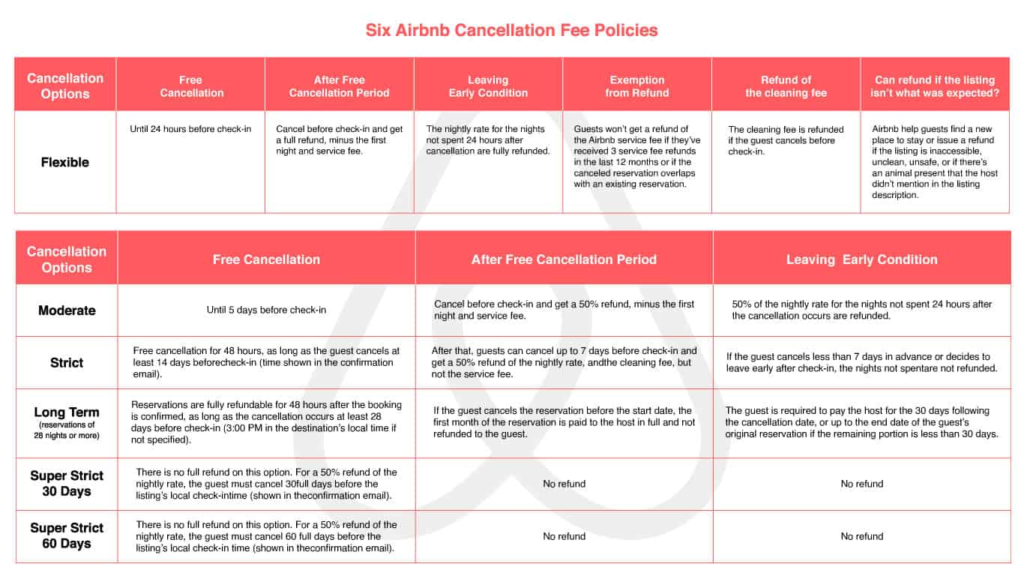
Before you cancel an Airbnb reservation, check the cancellation policy attached to your booking. The refund amount can vary depending on the reservation, the time of cancellation, and the terms that apply to the stay.
Check the Policy for Your Reservation
Open your reservation in Trips and look for the cancellation information. Airbnb should show the applicable refund details before you complete the cancellation.
Don’t assume that every Airbnb reservation follows the same refund rules. Your booking may have different terms from another reservation, so always check the details for your specific stay.
Full, Partial, or No Refund
Depending on the policy and timing, a cancellation may result in a full refund, partial refund, or no refund.
The amount can also depend on how close the cancellation is to the scheduled check-in. Review the amount Airbnb displays during the cancellation process before you confirm.
Check for Special Circumstances
Unexpected events can sometimes affect cancellation and refund options. If something outside your control prevents you from completing the trip, review Airbnb’s current extenuating circumstances policy to see whether it may apply to your situation.
If you think your circumstances qualify, provide Airbnb with the relevant information when you contact support.
Refunds May Take Time
After you cancel, the refund may not appear in your account immediately. The time can depend on the payment method and financial institution involved.
Keep your cancellation confirmation and refund information until the money reaches your account.
Review the Refund Before You Confirm
Airbnb can display the expected refund during the cancellation process. Take a moment to check that amount before completing the cancellation.
If the amount seems different from what you expected, review the cancellation policy and booking details before proceeding.
What Happens After You Cancel an Airbnb Reservation?
After you cancel an Airbnb reservation, Airbnb updates the booking status and applies the cancellation terms associated with your stay. The next steps usually involve confirming the cancellation and processing any refund that your reservation qualifies for.
Your Reservation Status Changes
Once Airbnb confirms the cancellation, the reservation should no longer remain active as a confirmed stay. Check your Trips section to make sure the booking shows the correct status.
You should also receive a cancellation confirmation through your Airbnb account or email. Keep this confirmation until you have finished dealing with any refund.
Your Refund Depends on the Booking
Airbnb calculates your refund according to the cancellation policy for your reservation. You may receive the full amount, part of the payment, or no refund depending on the applicable terms.
Before canceling, Airbnb normally shows the expected refund so you can review the financial result before confirming your decision.
The Refund May Take Some Time
A refund does not always appear in your bank account immediately after cancellation. Processing time can vary based on the payment method and your financial institution.
If Airbnb confirms a refund but you do not see it after the expected processing period, check your payment account and contact Airbnb if necessary.
Keep Your Cancellation Records
Save your cancellation confirmation, refund details, and original booking information. These records can help you resolve a billing or refund issue if one occurs later.
If you need to discuss the reservation with Airbnb Support, having these details available can make the process easier.
If you’re also canceling another type of accommodation, see our guide on How to Cancel Hotel Bookings and Get Your Money Back for more information about cancellation and refunds.
Why Can’t I Cancel an Airbnb Reservation?
If you cannot cancel your Airbnb reservation, the issue may come from the booking status, your account, the cancellation process, or a technical problem. Start by opening the reservation and checking the options Airbnb provides for that specific booking.
The Reservation May Have Different Cancellation Terms
Airbnb can apply different cancellation policies to different reservations. Your booking may have restrictions that affect when and how you can cancel.
Open the reservation details and review the cancellation information carefully. If Airbnb shows a specific cancellation deadline, check whether that deadline has already passed.
You May Be Checking the Wrong Reservation
If you have several upcoming trips, make sure you have opened the correct booking. Check the property name, dates, and reservation details before trying to cancel.
A different reservation may have different cancellation terms, so selecting the wrong booking can cause confusion.
The Cancellation Option May Not Appear
If you cannot find the cancellation option, close and reopen the Airbnb app or sign in to your account through the website. Make sure you use the account that made the reservation.
You can also check whether Airbnb has sent you any recent messages about the booking. Important changes to a reservation may appear in your account or email.
You May Have a Payment or Booking Issue
Sometimes a problem with the reservation or payment information can make the cancellation process unclear. Review your booking details and check whether Airbnb shows any alerts or pending actions.
If the reservation still does not provide a clear cancellation option, avoid making another booking or payment while you investigate the issue.
Contact Airbnb Support
When the normal cancellation process does not work, contact Airbnb Support and provide your reservation details. Explain what happens when you try to cancel and include any error message you see.
Keep screenshots, emails, and reservation information if the problem continues. These details can help Airbnb understand the issue and tell you which cancellation options apply.
Check the Refund Before You Confirm
Even when Airbnb allows you to cancel, the refund may not match the amount you originally paid. Review the refund information carefully before confirming the cancellation.
If you believe Airbnb has calculated the refund incorrectly, save the displayed amount and contact support for clarification.
Next section:
Frequently Asked Questions About Canceling an Airbnb Reservation
Can I Cancel an Airbnb Reservation Anytime?
Not always. You can cancel a reservation before check-in, but the refund depends on the cancellation policy and the timing of your cancellation. Check the policy for your specific booking before you confirm.
Can I Cancel an Airbnb Reservation Without a Penalty?
You may be able to cancel without losing money if your reservation’s cancellation terms allow a full refund at the time you cancel. Review the refund amount Airbnb shows before confirming the cancellation.
What Happens If I Cancel My Airbnb Reservation?
Airbnb cancels the booking and applies the refund terms for your reservation. Depending on the policy, you may receive a full refund, partial refund, or no refund. Your refund may also take some time to reach your payment account.
Can an Airbnb Host Cancel a Reservation?
Yes, a host can cancel a reservation in certain circumstances, but Airbnb may apply consequences depending on the reason and situation. Hosts should review Airbnb’s host cancellation rules before canceling a confirmed booking.
Conclusion
Canceling an Airbnb reservation usually takes only a few steps, but the refund depends on the cancellation policy attached to your booking. Before you confirm the cancellation, review the policy, refund amount, and any applicable terms.
If you want to cancel an Airbnb reservation without a penalty, check your booking as early as possible and review the cancellation details Airbnb provides. Guests and hosts should also follow the appropriate cancellation process for their role.
Keep your cancellation confirmation and refund information after completing the process. These records can help if you need to contact Airbnb about your reservation or payment later.